20 Microsoft AI Concepts You Need to Know in 2026 (With Cheat Sheet)

Howdang Rashid
Saturday, 22 August 2026 · 5 min read
Microsoft's AI stack is moving faster than any one person can track.
New products, renamed products, and genuinely new ideas land every quarter, and it has become hard to tell which concepts actually matter for your work.
This guide covers the 20 Microsoft AI concepts worth knowing in 2026 - what each one is, why it exists, and where it fits - whether you work in Microsoft 365, the Power Platform, Dynamics 365, or Azure.
Here's the full set on one page:
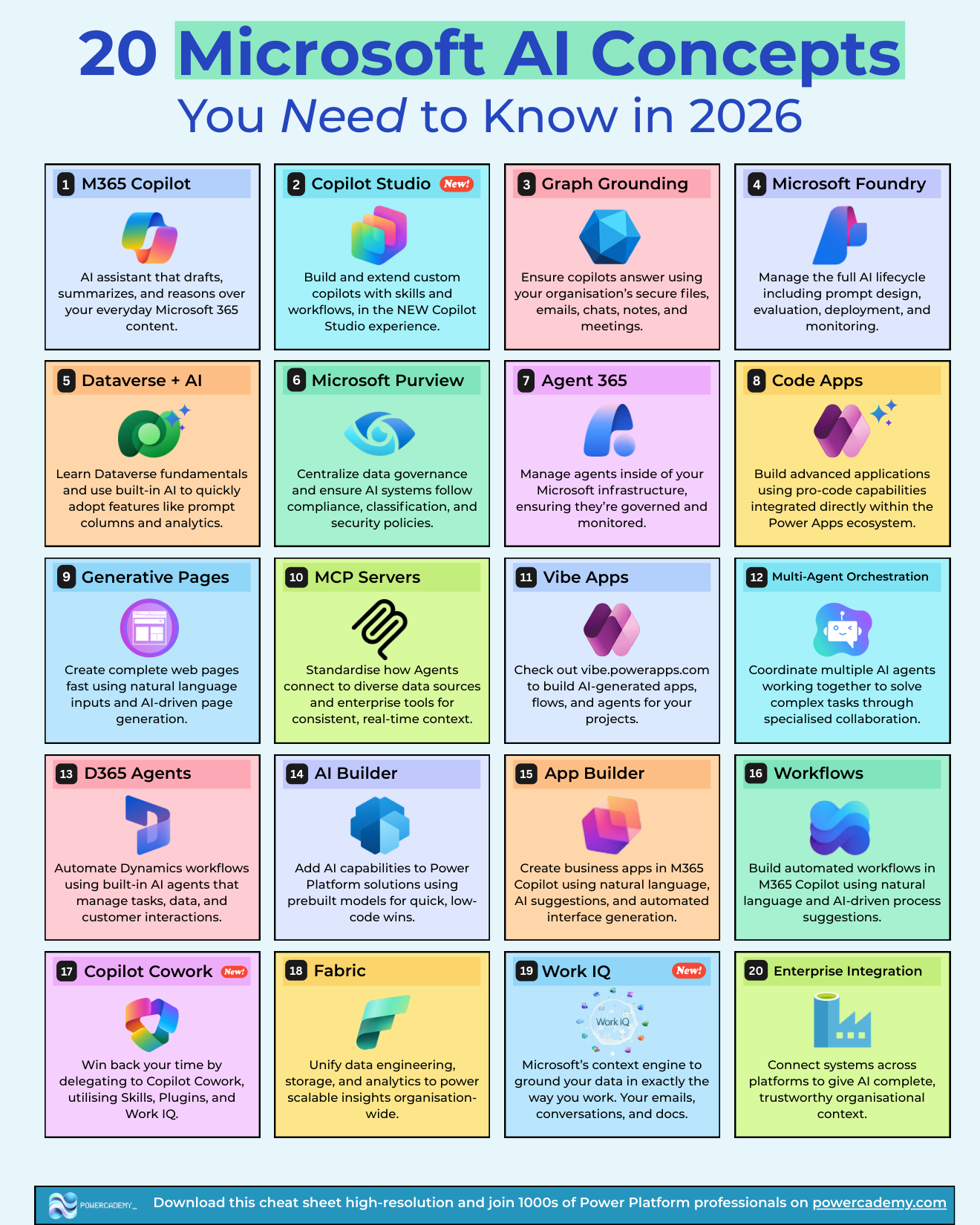
Want the hi-res version of this cheat sheet? It's free in the Powercademy Success Kit, along with hundreds of other Power Platform and Microsoft AI resources.
What are the 20 Microsoft AI concepts for 2026?
In one pass, the 20 concepts are:
M365 Copilot
Copilot Studio
Graph Grounding
Microsoft Foundry
Dataverse + AI
Microsoft Purview
Agent 365
Code Apps
Generative Pages
MCP Servers
Vibe Apps
Multi-Agent Orchestration
D365 Agents
AI Builder
App Builder
Workflows
Copilot Cowork
Fabric
Work IQ
Enterprise Integration.
They break down into four layers: the Copilot experience layer people use every day, the maker layer where you build apps and automation with AI, the agent layer that is reshaping how work gets delegated, and the data and governance layer underneath everything. The sections below take them layer by layer.
Which Copilot concepts matter most?
M365 Copilot is the AI assistant embedded across Word, Excel, Outlook, Teams, and the rest of Microsoft 365. It drafts, summarizes, and reasons over your everyday content. For most organisations it is the front door to Microsoft AI, and the concept everything else builds on.
Copilot Studio is where you build and extend your own copilots and agents with custom skills, knowledge, and workflows. The new Copilot Studio experience is agent-first, and it has become the centre of gravity for anyone building conversational AI on the Microsoft stack. If you are weighing up the old versus new experience, I've broken that down in Copilot Studio classic vs the new harness.
Graph Grounding is what makes Copilot answers trustworthy inside your organisation: responses are grounded in your secure files, emails, chats, notes, and meetings via Microsoft Graph, with your existing permissions respected. When people ask "how does Copilot know that?", Graph Grounding is the answer.
Copilot Cowork is the newest shift: instead of prompting an assistant, you delegate whole pieces of work to Copilot Cowork, which uses Skills, Plugins, and Work IQ to get them done. Think of it as moving from autocomplete to a junior colleague.
Work IQ is Microsoft's context engine - it grounds AI in exactly the way you work, learning from your emails, conversations, and documents so Copilot and Cowork behave like they actually know your job, not just your files.
How does AI show up in the Power Platform?
Dataverse + AI brings AI directly into your data layer: prompt columns, AI-powered analytics, and natural-language features built into the database the whole Power Platform runs on. Solid Dataverse fundamentals now pay off twice.
AI Builder is the quickest low-code win: prebuilt models for document processing, classification, and prediction that drop straight into Power Apps and Power Automate.
Code Apps open the pro-code door inside the Power Apps ecosystem - build advanced applications with real code while staying integrated with Dataverse, connectors, and governance.
Generative Pages let you create complete, working pages for model-driven apps from natural-language prompts, with AI generating the layout and code.
Vibe Apps (vibe.powerapps.com) is Microsoft's take on vibe coding for business apps: describe what you want, and AI generates apps, flows, and agents you can refine.
App Builder and Workflows bring building into M365 Copilot itself - create business apps and automated workflows from natural language without leaving the Copilot experience. They lower the barrier to entry for makers who live in Microsoft 365 all day.
What is changing with agents in 2026?
Agent 365 answers the question every IT leader is asking: who manages all these agents? It treats agents like employees inside your Microsoft infrastructure - inventoried, governed, and monitored.
Multi-Agent Orchestration is the pattern behind the buzzword: multiple specialised agents coordinating on a complex task, each handling the part it is best at, instead of one giant agent trying to do everything.
D365 Agents are that pattern productised for Dynamics 365 - built-in agents that automate sales, service, and operations workflows, managing tasks, data, and customer interactions inside the processes you already run.
MCP Servers (Model Context Protocol) standardise how agents connect to data sources and enterprise tools. Instead of a custom integration per agent per system, MCP gives every agent a consistent, real-time way to reach your systems. It is quickly becoming the USB standard of the agent world.
What underpins it all: data, governance, and integration
Microsoft Foundry is where serious AI work gets managed end to end - prompt design, evaluation, deployment, and monitoring across the full AI lifecycle. When a proof of concept needs to become a product, Foundry is the toolchain.
Microsoft Purview keeps the whole stack compliant: centralised data governance, classification, and security policies that AI systems have to respect. In regulated industries, Purview readiness decides whether Copilot gets switched on at all.
Fabric unifies data engineering, storage, and analytics into one platform, so the data feeding your AI is consistent and scalable organisation-wide.
Enterprise Integration is the connective tissue: linking systems across platforms so AI has complete, trustworthy organisational context rather than a partial view. If your automation backbone needs work here, start with Power Automate vs Logic Apps vs Azure Functions.
FAQ
Do I need to learn all 20 concepts?
No. You need to be able to place all 20 on a map, and go deep on the three or four that touch your role. The groupings above are the map; the cheat sheet is the one-page reminder.
What's the difference between Copilot Studio and Microsoft Foundry?
Copilot Studio is the low-code home for building copilots and agents on Microsoft 365 and Power Platform. Microsoft Foundry is the pro-code platform for managing the full AI lifecycle - custom models, evaluation, deployment, and monitoring. Many organisations use both: Studio for the front end, Foundry for the heavy lifting behind it.
Where should a Power Platform professional start in 2026?
Start with Copilot Studio and Dataverse + AI - they sit closest to the skills you already have and are where Microsoft is investing hardest. Then add MCP Servers, because agent-to-system connectivity is fast becoming the differentiating skill.
Is Work IQ the same as Microsoft Graph?
No. Microsoft Graph is the API surface over your Microsoft 365 data. Work IQ is a context engine built on top of it - it models how you actually work across emails, conversations, and documents, so AI can act with that context rather than just query raw data.
The hi-res, printable version of this cheat sheet is in the Powercademy Success Kit - free, along with hundreds of other cheat sheets, roadmaps, and guides for Microsoft professionals.