Copilot Studio Classic vs the New GitHub Copilot Harness: Which Should You Build On?

Howdang Rashid
Sunday, 16 August 2026 · 4 min read
The new Copilot Studio experience went generally available this month.
That means there are now three ways to build low-code agents in the Microsoft ecosystem - and they are genuinely different tools, with genuinely different pricing.
I've spent time building on both harnesses, and the short version is this: the new experience is more capable and more pleasant to build with, but the licensing model will keep a lot of organisations on classic for a while yet.
Here's the full picture so you can make the call for your own estate:
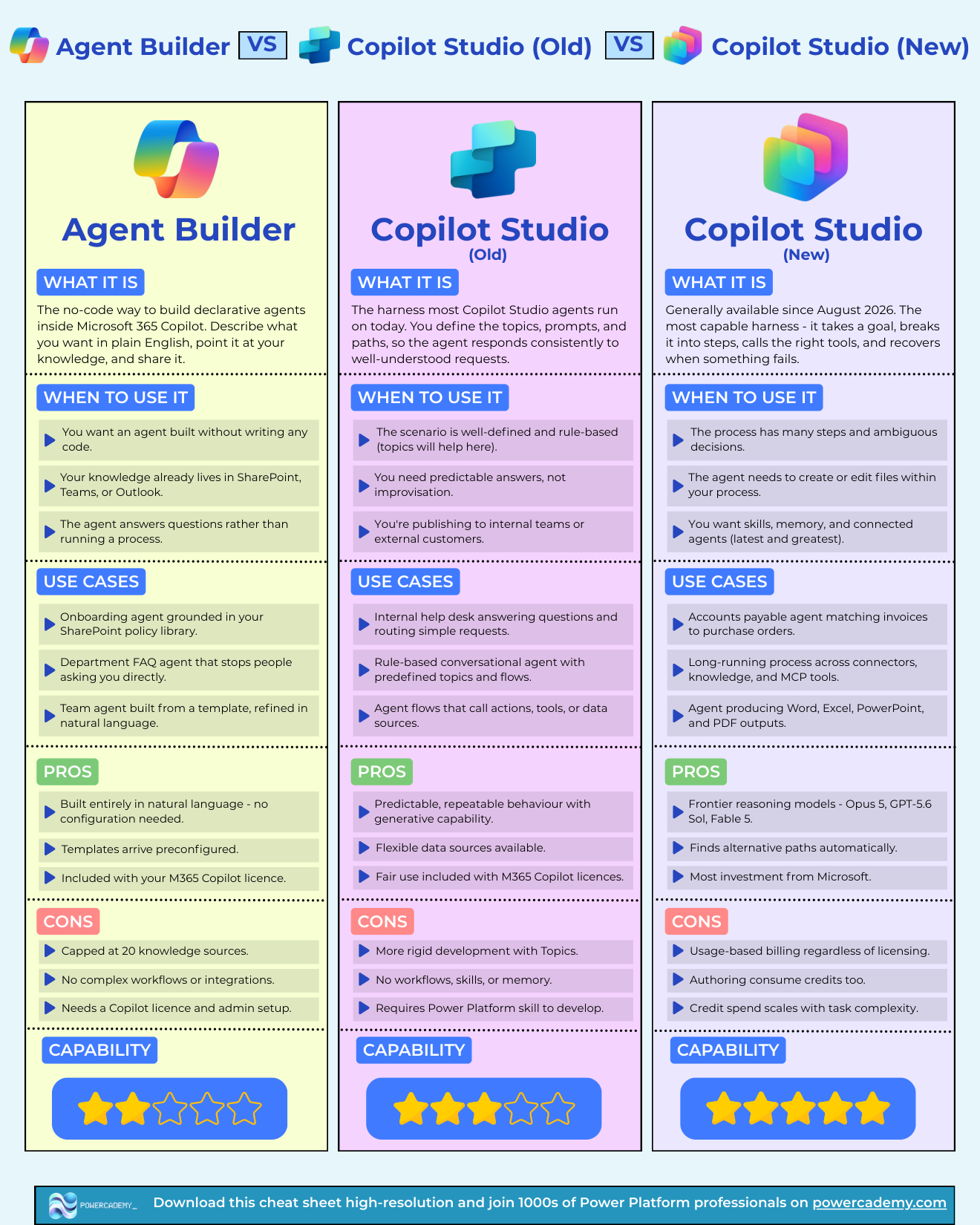
Grab the hi-res version of this cheat sheet free in the Powercademy Success Kit.
What are the three ways to build agents in the Microsoft ecosystem?
Agent Builder - lives inside Microsoft 365 Copilot. You describe the agent, point it at a knowledge source, and share it. It's the lightest-weight option - fine for personal and team-level Q&A agents, but not built for business processes.
Copilot Studio (classic) - is what Microsoft now calls the Standard harness. You build with topics, prompts, and defined paths. It's predictable and rules-based, and it's what most agents running in production today are built on.
Copilot Studio (new) - is the GitHub Copilot harness. Instead of following paths you define, it takes a goal, breaks it into steps, calls the tools it needs, creates files, and recovers when a step fails.
How is the new harness different in practice?
The classic harness executes the conversation you designed. The new harness works out how to reach the outcome you asked for.
That difference matters most when your agent runs a business process rather than answering questions. If the agent needs to take a goal, sequence its own steps, use several tools, and recover from failures along the way, the new harness isn't close in capability to classic - it's simply better at that job. It's also, honestly, a much more pleasant end-to-end building experience.
If your agent answers questions against a knowledge source and follows well-defined paths, classic does that predictably today, and it's battle-tested in production.
What does each one cost to run?
This is where most of the decisions will actually be made, and it's tripping a lot of people up.
The classic harness comes with fair use included in your Microsoft 365 Copilot licences. A typical classic interaction costs somewhere between $0.01 and $0.12 in credits if you're paying per use.
The new harness is usage-based billing regardless of your Copilot licensing. A single run on the new harness costs $1 to $5+, credits are consumed at runtime rates - and they're consumed while you're authoring and testing too. Testing a heavy agent on the new harness bills at the same runtime rates as production.
All of the numbers above come from the official Microsoft Copilot Credits licensing documentation - worth reading in full before you commit either way.
So which one should you build on?
My honest take: plenty of organisations will carry on building on classic Copilot Studio for a while yet, purely because of the licensing implications. It's a give and take - some organisations will go one way, some the other.
A reasonable way to decide:
Q&A and guided conversations, predictable volume, M365 Copilot licences in place - classic. The fair-use inclusion makes the economics hard to argue with.
Goal-driven business processes where the agent needs to orchestrate tools and recover from failures - the new harness is the stronger tool, if you can stomach usage-based billing.
Personal or team-level helpers - Agent Builder, and don't overthink it.
Will the pricing change?
I expect so. As Microsoft leans further on their own models - which I believe is inevitable - I'd expect this pricing to move. But that's a forecast, not a plan. Right now, the picture above is what you can reference to make the call.
FAQ
Is the new Copilot Studio experience generally available?
Yes - the new experience (the GitHub Copilot harness) reached general availability in August 2026. The classic Standard harness remains fully supported.
Does the new Copilot Studio harness use my Microsoft 365 Copilot licence?
No. The new harness is usage-based billing regardless of your Copilot licensing. Classic includes fair use with M365 Copilot licences.
How much does a Copilot Studio agent run cost?
On the classic harness, a typical interaction costs roughly $0.01-$0.12. On the new harness, a single run is $1-$5+, and authoring/testing consumes credits at the same runtime rates.
Can I keep building on classic Copilot Studio?
Yes. Classic is what most production agents run on today, and there's no forced migration. Many organisations will stay on it for cost reasons alone.
I keep a one-page cheat sheet comparing all three options - it's in the Powercademy Success Kit along with hundreds of other Power Platform resources, free.