Power Automate vs Logic Apps vs Azure Functions: Choosing the Right Microsoft Automation Tool

Howdang Rashid
Tuesday, 18 August 2026 · 3 min read
Stop building everything in Power Automate.
Most people treat it as the only option for Microsoft automation - and for a huge chunk of department-level work, it genuinely is the right call. But architects know that using the wrong tool leads to technical debt and licensing headaches, and choosing the right automation and integration tool is one of the most important decisions a Power Platform solution architect makes.
Here's the mental model I use, and the decision question that makes the tool pick itself across the Microsoft Automation tools:
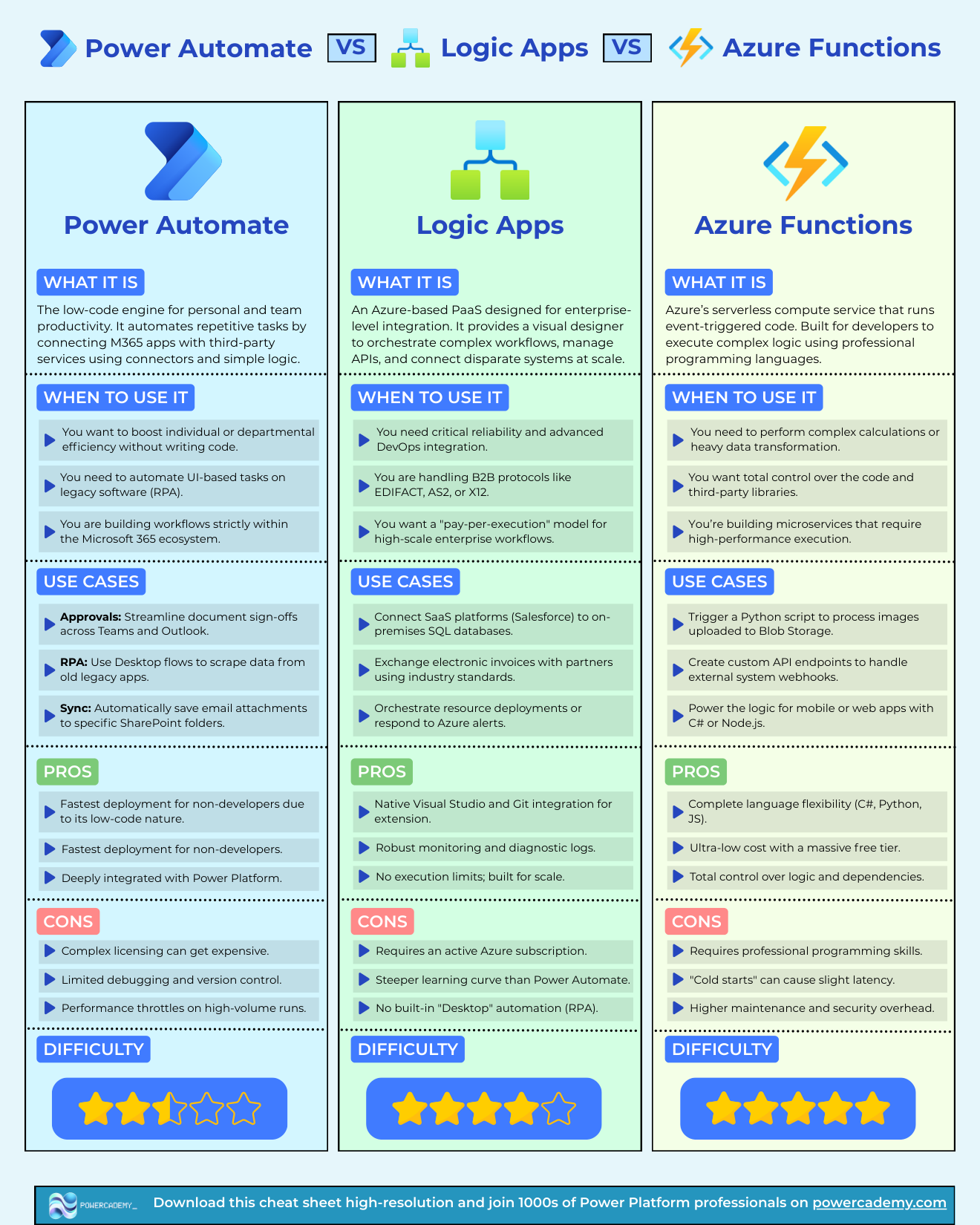
The hi-res PDF of this decision matrix is free in the Powercademy Success Kit.
The three engines
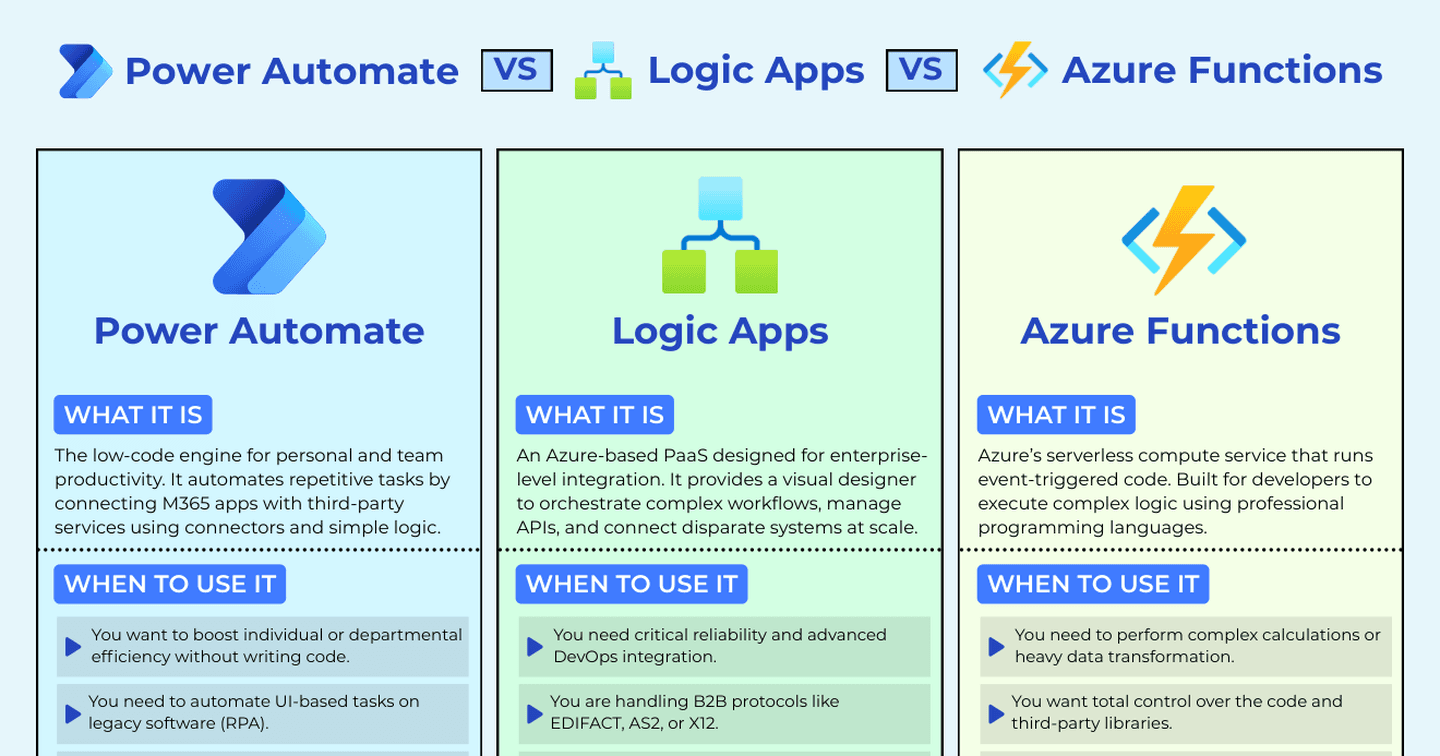
Power Automate - the productivity engine: Best for low-code business tasks and desktop RPA. It's fast to build, it's deeply integrated with Microsoft 365, and for approvals, notifications, and departmental process automation it's unbeatable on speed of delivery. The architect's take: fast to build, but watch for performance throttles.
Azure Logic Apps - the integration engine: Best for mission-critical and enterprise system integration. Pay-per-execution, Git integration, native to Azure, robust monitoring, and built for massive scale. When workflows are infrastructure rather than productivity, this is where they belong.
Azure Functions - the code engine: Best for complex logic and high-performance microservices. When the logic is genuinely complex, or you need control over performance and dependencies, writing code earns its place - with total control for developers at an ultra-low cost.
The comparison at a glance
Power Automate | Logic Apps | Azure Functions | |
|---|---|---|---|
Model | Low-code flows + RPA | Workflow-as-infrastructure | Code (serverless) |
Best for | Departmental tasks, approvals, RPA, low-volume integration | B2B / enterprise integration | Complex logic, microservices |
Billing | Per-user / per-flow licensing | Pay-per-execution | Consumption (ultra-low cost) |
ALM | Solutions | Git / ARM native | Full DevOps |
Watch out for | Throttling, licensing at scale | Overkill for simple tasks | You own the code forever |
The 50,000-runs-a-day mistake
Here's the failure mode I see most: a team picks Power Automate for a workflow that needs to run 50,000 times a day. Twelve months in, they hit throttling, licensing headaches, and performance ceilings that force a rebuild - and rebuilds are never cheap. The flow wasn't badly built; it was built on the wrong engine for its volume.
The reverse mistake is quieter but just as real: standing up Logic Apps and DevOps pipelines for a five-step approval flow a maker could have delivered in an afternoon.
I've always said Power Automate is totally okay for low-volume integration, but when you're looking at things at a higher scale, it can quickly become the wrong tool.
The question that picks the tool
The real question isn't "which one is best". It's:
What is this specific workload optimising for - speed of delivery, scale, cost, control, or integration depth?
Speed of delivery, M365-centric, human-in-the-loop → Power Automate
Scale, reliability, enterprise integration, ops-grade monitoring → Logic Apps
Complex logic, performance, custom dependencies → Azure Functions
Once you can answer what the workload is optimising for, the tool picks itself.
FAQ
Can Power Automate call Logic Apps or Azure Functions?
Yes - and mixing them is often the right architecture: a Power Automate flow for the human-facing steps, calling a Function or Logic App for the heavy lifting.
Is Logic Apps just Power Automate for Azure?
They share the same underlying workflow engine and expression language, but the licensing, ALM story, and operational model are completely different - that's precisely what makes each right for different workloads.
When does desktop RPA come into it?
When the system you're automating has no API. Power Automate's desktop flows are the Microsoft-stack answer for legacy UI automation.
What about Copilot Studio agents for automation?
Agents are for goal-driven work involving reasoning or conversation; these three engines are for deterministic workflows. Increasingly the answer is both - an agent orchestrating, flows executing.
I built a cheat sheet that walks this exact decision - who hosts it, how it reaches data, how it ships, and what your users need to run it. The hi-res version is in the Powercademy Success Kit, free with hundreds of other resources.