Vibe Apps vs Canvas Apps vs Code Apps: Three Ways to Build in 2026

Howdang Rashid
Saturday, 22 August 2026 · 3 min read
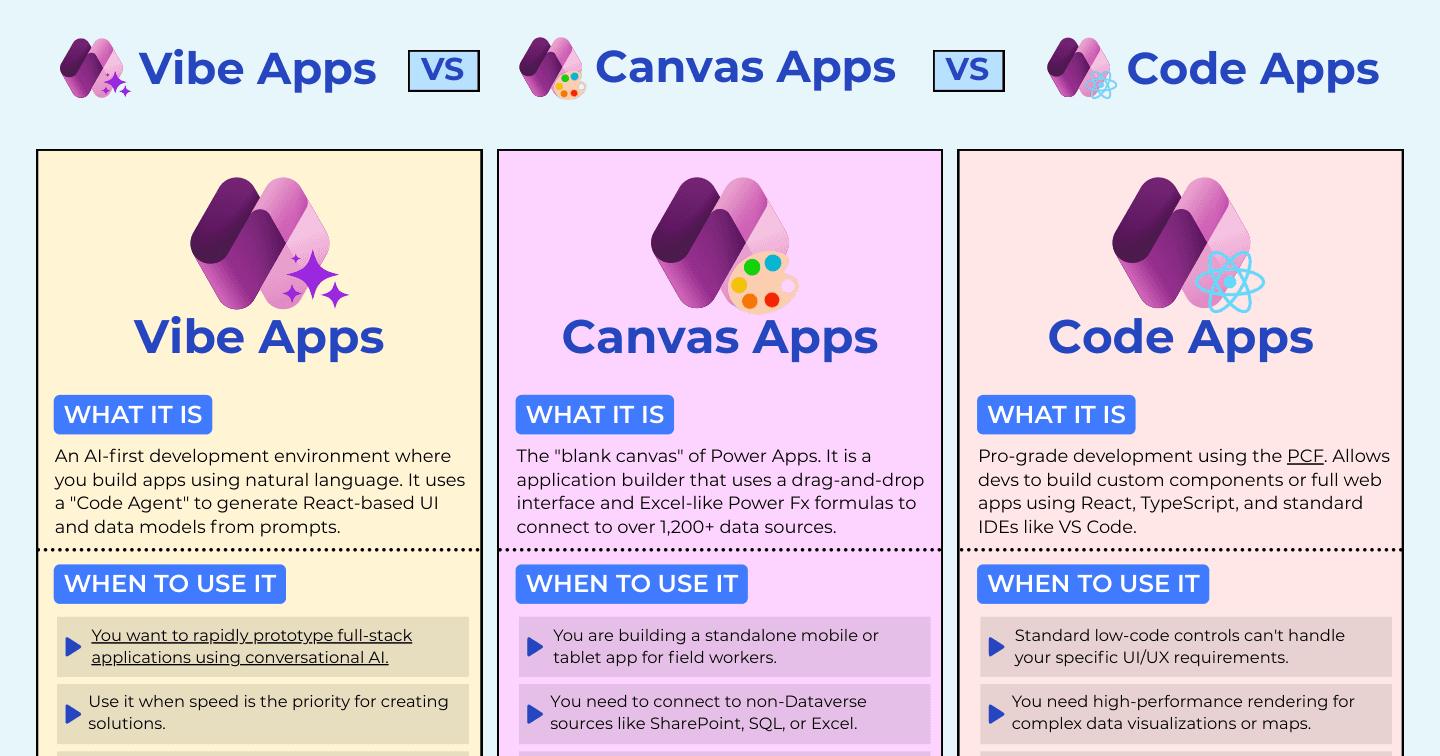
Power Apps now spans three development philosophies: Vibe Apps, where AI generates the application from a conversation; canvas apps, the classic drag-and-drop blank canvas; and code apps, where professional developers own the whole stack. Speed, control, and power - pick the axis your project actually needs.
Want the hi-res version? It's free in the Powercademy Success Kit.
What are Vibe Apps?
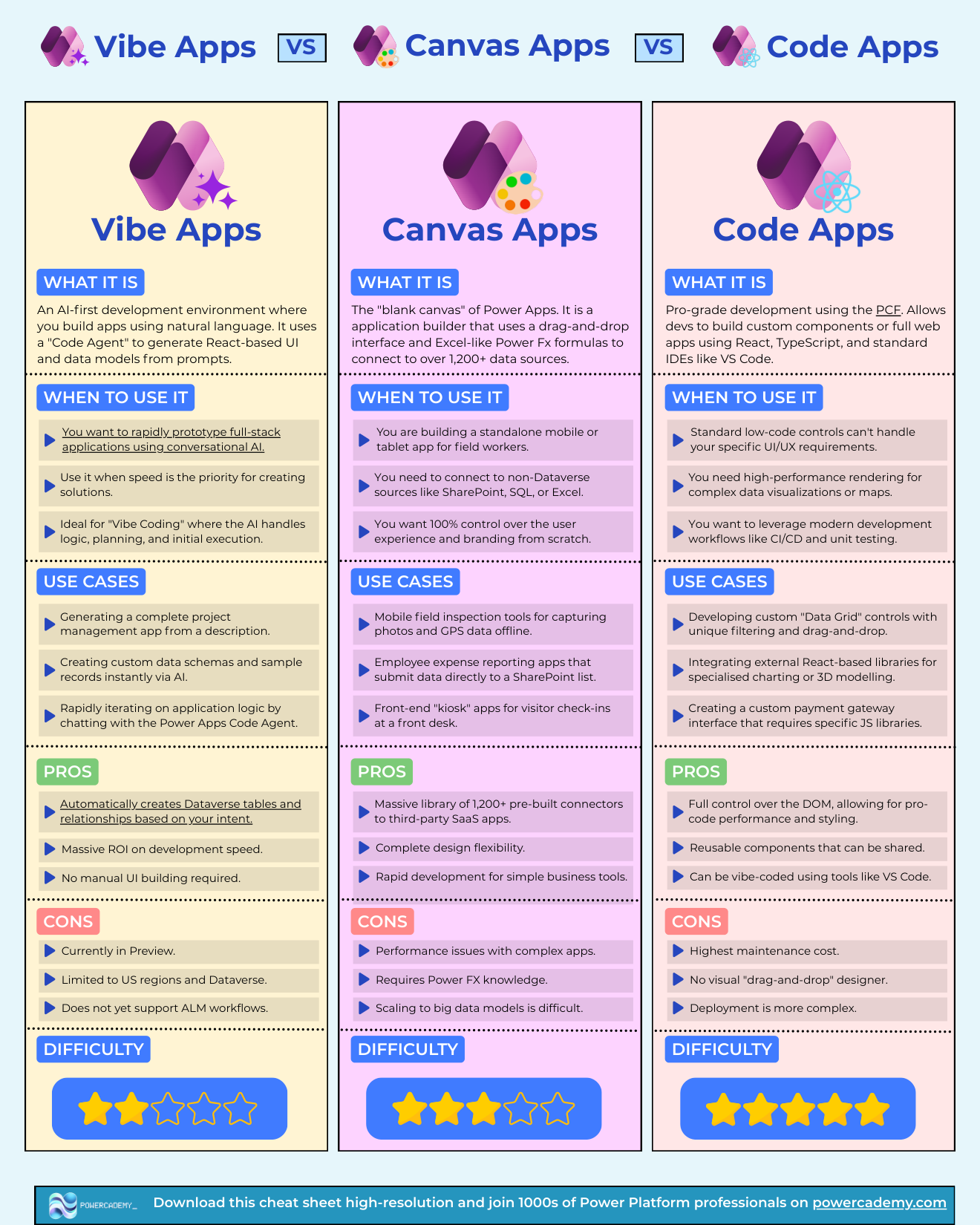
An AI-first development environment (vibe.powerapps.com) where you build apps in natural language: a Code Agent generates React-based UI and data models from prompts, automatically creating Dataverse tables and relationships from your intent. Use it to rapidly prototype full-stack applications - a complete project management app from a description, custom schemas with sample records, logic iterated by chatting. The ROI on development speed is massive; the honest caveats are that it's in preview, limited to US regions and Dataverse, and doesn't yet support ALM workflows.
Where do canvas apps still win?
The blank canvas remains the workhorse: standalone mobile and tablet apps for field workers, non-Dataverse sources like SharePoint, SQL, and Excel, and 100% control of experience and branding. Field inspections with photos and GPS, expense apps writing to SharePoint, kiosk check-ins - plus 1,200+ prebuilt connectors and rapid development for simple tools. Watch for performance in complex apps, the Power Fx learning curve, and difficulty scaling to big data models.
When do code apps take over?
When low-code controls can't express the requirement: high-performance rendering, custom data grids, React charting libraries, payment gateways, CI/CD and unit testing. Full DOM control and reusable components - and notably, code apps can themselves be vibe-coded with tools like VS Code and AI assistants. The costs: highest maintenance, no visual designer, and more complex deployment.
How do the three fit together?
Think of it as a speed-control-power triangle that's collapsing at the edges: Vibe Apps generate code you can graduate into a code-app workflow, and AI assistants now write canvas Power Fx and code-app React alike. The durable question isn't which tool - it's who owns the app in a year. Business team → canvas (or a promoted Vibe App); engineering team → code apps; nobody yet because you're validating an idea → Vibe Apps, this afternoon.
FAQ
Is a Vibe App production-ready?
Treat it as preview technology: no ALM support yet and regional limits. Prototype and validate with it, then promote the winners into a governed build. That will change as the preview matures - watch this space.
Will Vibe Apps replace canvas apps?
More likely they replace the blank-canvas starting point: AI generates the first version, makers refine in the designer. Canvas's connector breadth and offline/mobile strengths aren't going anywhere soon.
Can I move a Vibe App into a code-app workflow?
That's the natural graduation: Vibe Apps generate React, and code apps are React with Power Platform plumbing - so the prototype's code can seed a properly source-controlled build.
Which should our team standardise on?
Don't standardise on one - standardise the decision: prototype in Vibe, deliver maker-owned apps in canvas, deliver engineering-owned apps as code apps. The teams in trouble are the ones forcing every workload through a single door.
The hi-res version is in the Powercademy Success Kit - free, along with hundreds of other cheat sheets, roadmaps, and guides for Microsoft professionals.