Custom Pages vs Generative Pages vs Code Apps: Extending Model-Driven Apps

Howdang Rashid
Saturday, 22 August 2026 · 3 min read
When a model-driven app needs more than forms and views, you now have three escape hatches: custom pages (canvas authoring with Power Fx), generative pages (AI-generated React you can edit), and code apps (full pro-code). The right pick depends on who's building, what the page must do, and how much code you want to own.
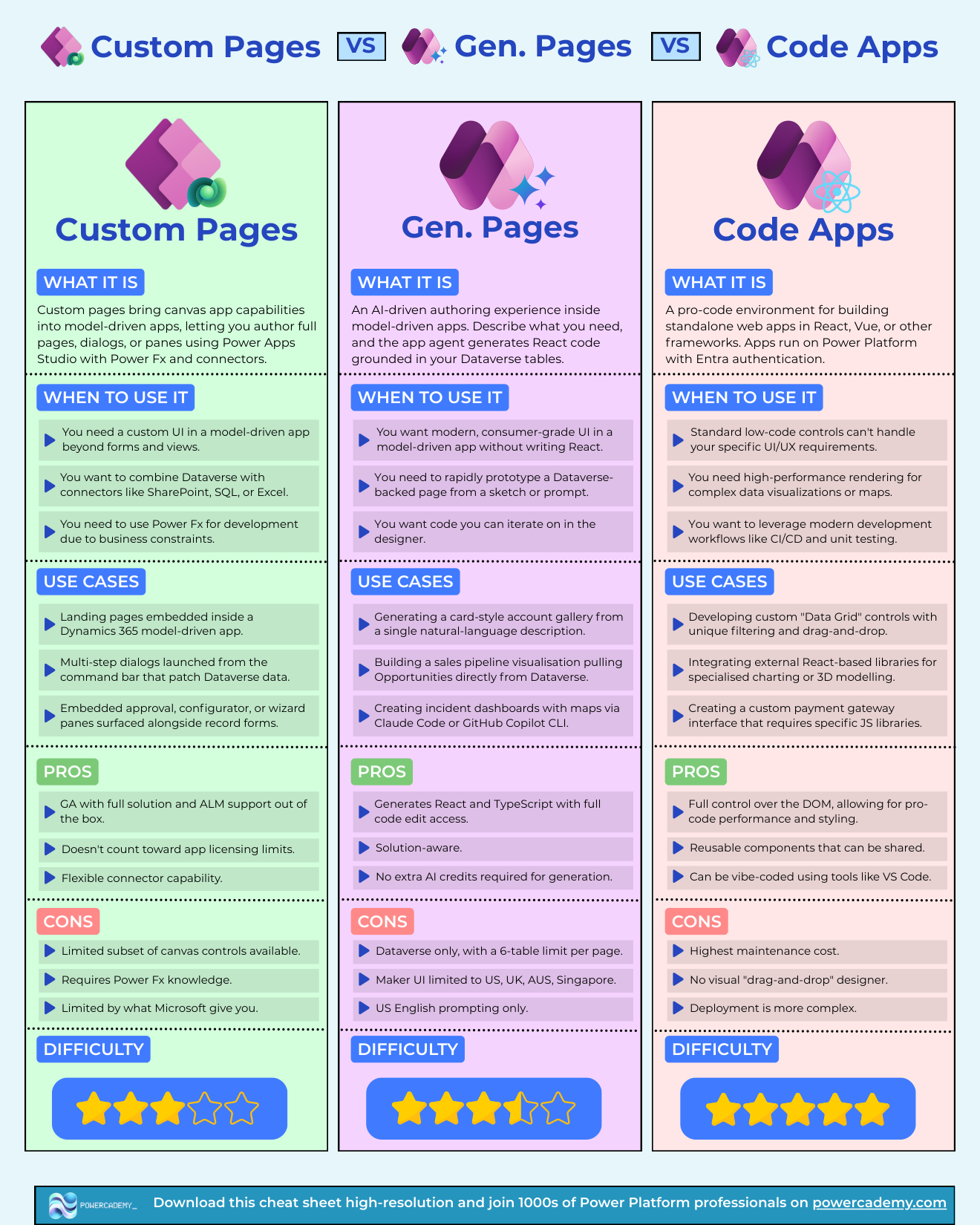
Want the hi-res version? It's free in the Powercademy Success Kit.
When are custom pages the answer?
Custom pages bring canvas capabilities into model-driven apps - full pages, dialogs, or panes authored in Power Apps Studio with Power Fx and connectors. Use them for custom UI beyond forms and views, for combining Dataverse with SharePoint, SQL, or Excel, and when business constraints keep you in Power Fx. Typical wins: landing pages inside Dynamics 365, multi-step command-bar dialogs that patch Dataverse, embedded approval and configurator panes. The pedigree: GA with full solution and ALM support, no extra app-licence impact, flexible connectors. The limits: a subset of canvas controls, Power Fx required, and you're bounded by what Microsoft ships.
What do generative pages change?
Generative pages are the AI-driven authoring experience inside model-driven apps: describe what you need (or sketch it) and get modern, consumer-grade UI as React and TypeScript - with full code edit access. Card-style account galleries from a sentence, pipeline visualisations pulling Opportunities, incident dashboards with maps built via Claude Code or GitHub Copilot CLI. They're solution-aware and generation needs no extra AI credits. Current constraints: Dataverse only with a 6-table limit per page, maker UI limited to US, UK, Australia, and Singapore, and US-English prompting.
And when is it a code app instead?
When the requirement outgrows a page: high-performance rendering, external React libraries, custom grids, payment interfaces, CI/CD and unit testing. Full DOM control and reusable components, at the price of the highest maintenance cost and no visual designer. The rule of thumb: pages extend a model-driven app; code apps ARE the app.
FAQ
Custom page or generative page for my next model-driven screen?
Need external connectors or you're outside the supported regions → custom page. Dataverse-only, modern UI, and you value editable React output → generative page. Both live happily in the same app.
Can developers edit what generative pages produce?
Yes - that's the differentiator: real React and TypeScript with full edit access, iterable in the designer or via Claude Code and Copilot CLI. It's a code-first artifact born from a prompt, not a black box.
Does the 6-table limit make generative pages a toy?
No - most single-purpose pages (dashboards, galleries, wizards) touch two to four tables. It rules out mega-pages, which were a design smell anyway; split them into focused pages instead.
Do these three replace PCF components?
No - PCF is for custom controls inside forms and pages; these three are whole-page experiences. A generative page can even host the same visual goals a PCF used to, but form-level control customisation remains PCF territory.
The hi-res version is in the Powercademy Success Kit - free, along with hundreds of other cheat sheets, roadmaps, and guides for Microsoft professionals.