Navigating the New Map of the Power Platform: Six Ways to Build in 2026

Howdang Rashid
Saturday, 22 August 2026 · 3 min read
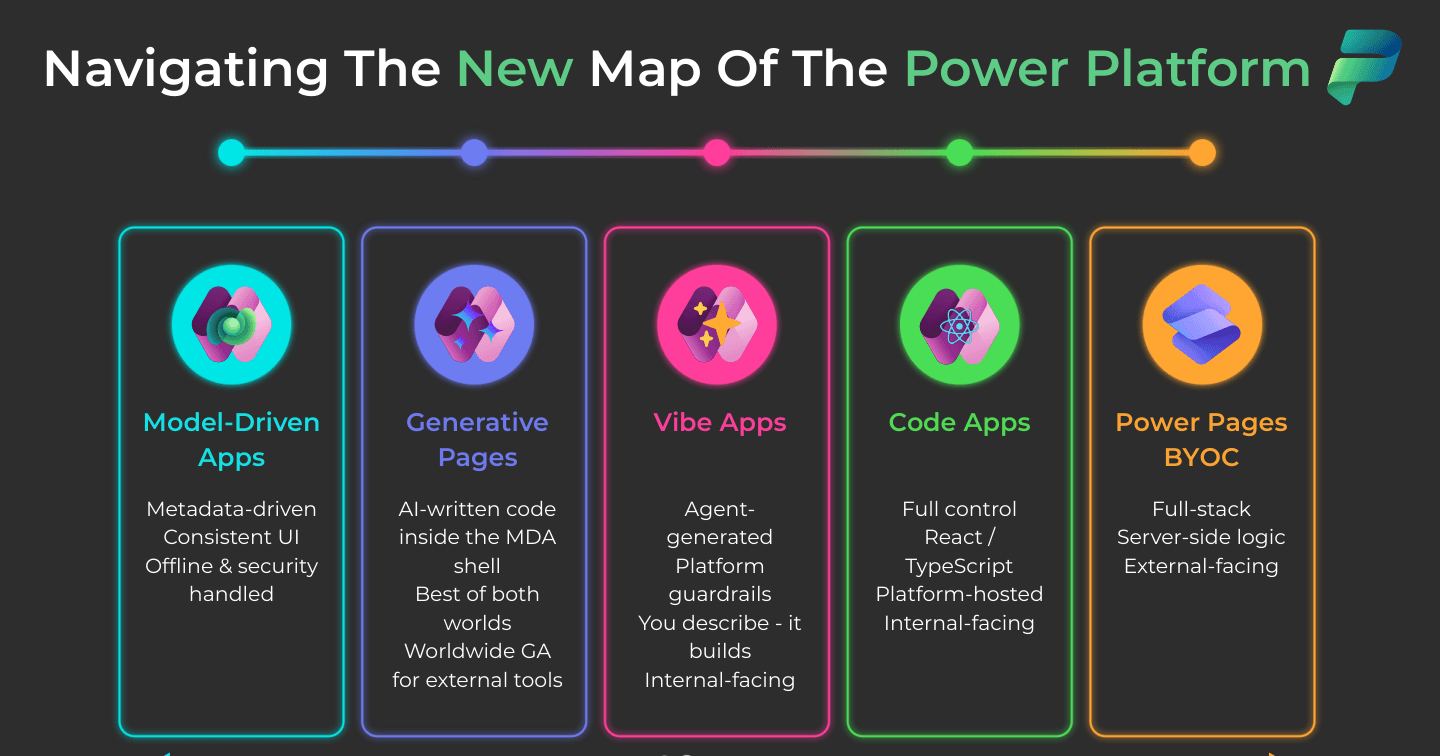
The Power Platform used to be a two-question decision: canvas or model-driven? Not any more. The 2026 map spans six ways to build - model-driven apps, generative pages, vibe apps, code apps, Power Pages, and bring-your-own-code - arranged on a spectrum from most managed to most flexible. This infographic lays out where each approach sits, and this post explains how to pick between them without a week of debate.
Want the hi-res version? It's free in the Powercademy Success Kit.
What changed in the Power Platform app landscape?
Two forces redrew the map: AI now writes application code, and Microsoft opened the platform to professional developers. Generative pages and vibe apps put AI-built UX inside platform guardrails, while code apps and BYOC let React and TypeScript teams ship on Power Platform infrastructure. The result is a genuine spectrum: on one end the platform manages everything for you, on the other you control everything and the platform hosts it.
What are the six ways to build?
From most managed to most flexible:
Approach | What it is | Best for |
|---|---|---|
Model-driven apps | Metadata-driven, consistent UI; offline and security handled by the platform | Internal, process-heavy apps on Dataverse |
Generative pages | AI-written code running inside the model-driven app shell - the best of both worlds | Tailored UX inside governed apps |
Vibe apps | Agent-generated apps with platform guardrails - you describe, it builds | Fast internal-facing builds by anyone |
Code apps | React and TypeScript with full control, hosted on the platform | Pro-dev internal apps with custom UX |
Power Pages | Full-stack websites with server-side logic, facing outside your tenant | External portals for customers and partners |
BYOC (bring your own code) | External tools brought onto the platform - now generally available worldwide | Existing web apps that need platform governance |
How do you choose the right approach?
Ask two questions in order. First, who is the audience? Outside your tenant means Power Pages or BYOC, full stop. Second, how much UI control do you need and who is building? Standard process UI means model-driven; custom UX from a maker or AI means generative pages or vibe apps; custom UX from a pro-dev team means code apps. Most tooling debates dissolve once those two answers are on the table, and most real solutions combine two approaches over one shared Dataverse.
FAQ
Where do canvas apps fit on this map?
Canvas apps still exist and still ship, but the new map shows where Microsoft's investment is heading: AI-generated UX (generative pages, vibe apps) is absorbing the tailored-screen use case from the managed side, while code apps absorb it from the flexible side. Existing canvas estates are fine; new tailored-UX builds should at least consider the newer options.
Are vibe apps and generative pages ready for production?
They are the newest points on the map and their capabilities are evolving quickly, so check current availability for your region and licence before committing a critical workload. The direction of travel is clear though: AI-built UX inside platform guardrails is a core part of the roadmap, not an experiment.
Do all six approaches use Dataverse?
Dataverse is the default data layer for model-driven apps, generative pages, vibe apps, and Power Pages, and the recommended one for code apps. BYOC brings its own stack but gains the most value when it reads and writes platform data. One shared Dataverse under multiple app types is the platform's quiet superpower.
Which approach should a beginner learn first?
Model-driven apps plus Dataverse. They teach the platform's data-first way of thinking, the security model, and the UI conventions everything else builds on. Once those click, each of the other five approaches is a variation on a theme rather than a new world.
The hi-res version is in the Powercademy Success Kit - free, along with hundreds of other cheat sheets, roadmaps, and guides for Microsoft professionals.