20 Programming Fundamentals Every Power Platform Developer Should Know

Howdang Rashid
Saturday, 22 August 2026 · 4 min read
Low-code does not mean no engineering. The Power Platform makes it easy to ship something fast, but the solutions that survive their first year in production are built by people who apply classic software fundamentals inside Power Apps and Power Automate: variables, data types, error handling, DRY, delegation, and the rest. This cheat sheet covers the 20 programming fundamentals every Power Platform developer should know, whether you come from a coding background or you are a maker levelling up.
Want the hi-res version? It's free in the Powercademy Success Kit.
Why do programming fundamentals matter in low-code development?
Because the platform abstracts syntax, not thinking. Power Fx is still a functional language, flows are still programs, and Dataverse is still a database. Delegation limits, race conditions, null values, and spaghetti logic hit low-code solutions just as hard as code-first ones - often harder, because the person building the app has not always been trained to spot them. Fundamentals are what turn a working demo into a maintainable solution that someone else can support.
What are the 20 programming fundamentals for Power Platform?
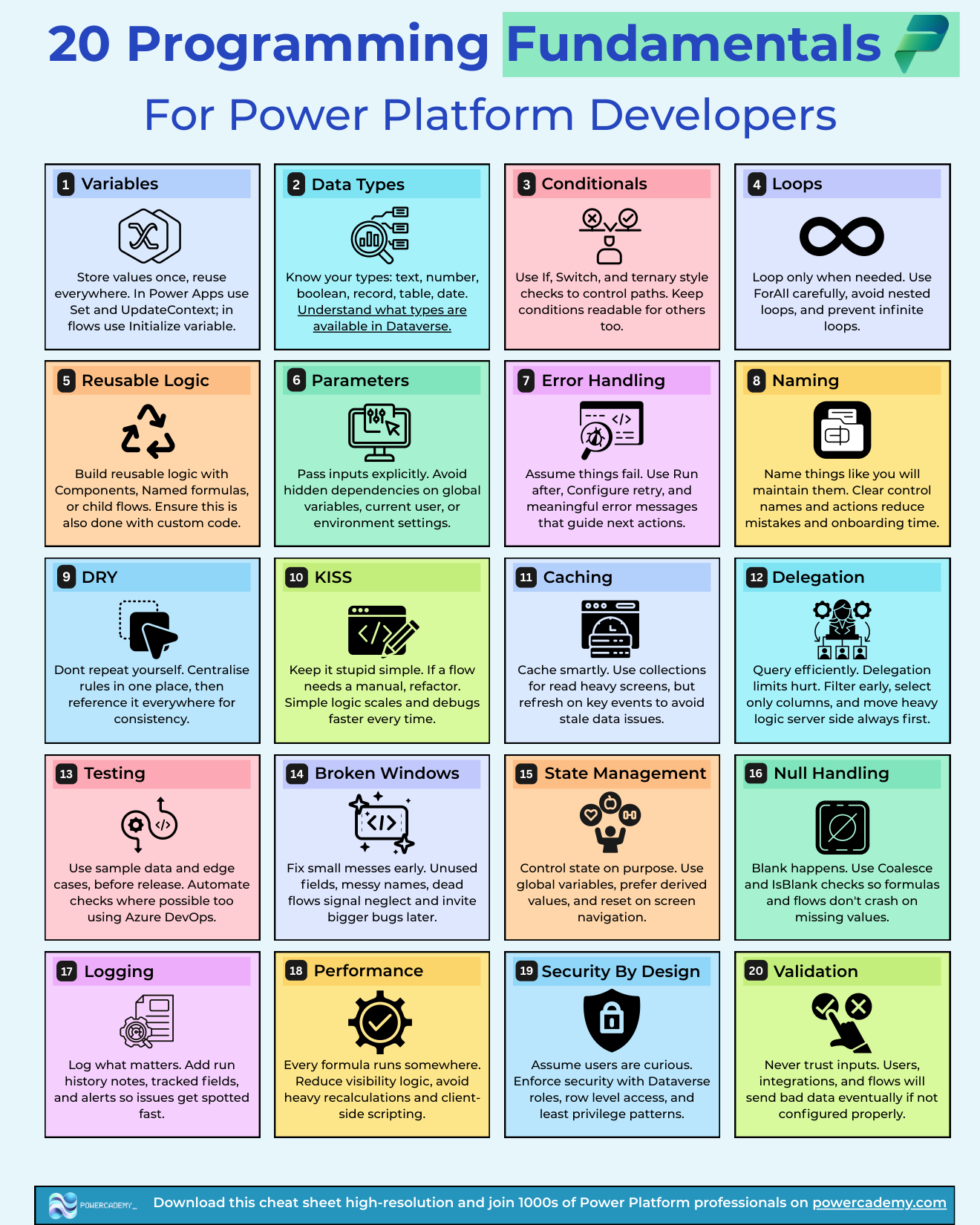
Here is the full list at a glance. Each one maps directly to a Power Apps or Power Automate feature you already have.
Variables - Store values once, reuse everywhere. Use Set and UpdateContext in Power Apps; Initialize variable in flows.
Data types - Know your types: text, number, boolean, record, table, date. Understand which types are available in Dataverse.
Conditionals - Use If, Switch, and ternary-style checks to control paths. Keep conditions readable for the next person too.
Loops - Loop only when needed. Use ForAll carefully, avoid nested loops, and prevent infinite loops.
Reusable logic - Build reusable logic with components, named formulas, or child flows. Do the same with any custom code.
Parameters - Pass inputs explicitly. Avoid hidden dependencies on global variables, the current user, or environment settings.
Error handling - Assume things fail. Use run-after conditions, retry policies, and meaningful error messages that guide the next action.
Naming - Name things like you will maintain them. Clear control and action names reduce mistakes and onboarding time.
DRY - Don't repeat yourself. Centralise rules in one place, then reference them everywhere for consistency.
KISS - Keep it stupid simple. If a flow needs a manual, refactor it. Simple logic scales and debugs faster every time.
Caching - Cache smartly. Use collections for read-heavy screens, but refresh on key events to avoid stale data.
Delegation - Query efficiently. Delegation limits hurt. Filter early, select only the columns you need, and move heavy logic server-side first.
Testing - Use sample data and edge cases before release. Automate checks where possible with Azure DevOps.
Broken windows - Fix small messes early. Unused fields, messy names, and dead flows signal neglect and invite bigger bugs later.
State management - Control state on purpose. Prefer derived values over duplicated variables, and reset state on screen navigation.
Null handling - Blank happens. Use Coalesce and IsBlank checks so formulas and flows don't crash on missing values.
Logging - Log what matters. Add run history notes, tracked fields, and alerts so issues get spotted fast.
Performance - Every formula runs somewhere. Reduce visibility logic, avoid heavy recalculation, and keep client-side scripting lean.
Security by design - Assume users are curious. Enforce security with Dataverse roles and row-level security, never just by hiding buttons.
Validation - Validate at every boundary. Check inputs in the app, check again in the flow, and enforce constraints in Dataverse itself.
Which fundamentals should you learn first?
Start with the four you will use in every single build: variables, data types, conditionals, and null handling. They cover the majority of day-one bugs. Then move to delegation and error handling, because those are the two that fail quietly in production rather than loudly in development. The design-level fundamentals - DRY, KISS, naming, broken windows - matter most once other people start touching your solutions, which happens sooner than you think.
FAQ
Do I need a computer science degree to apply these fundamentals?
No. Every fundamental on this list can be learned inside the Power Platform itself, one build at a time. A degree teaches them through Java or Python; you can learn the same concepts through Power Fx and flows, and they transfer in both directions.
What is the most common fundamental Power Platform developers get wrong?
Delegation, followed closely by null handling. Both work fine in small demos and break at production scale or with real-world messy data, which is exactly when they are hardest to debug.
Do these fundamentals apply to Copilot Studio and AI agents too?
Yes. Agents are still programs: they need clear naming, explicit parameters, error handling for failed actions, and validation of what tools return. If anything, the fundamentals matter more because AI-generated logic needs a human who can review it critically.
Where should I start if I have never programmed before?
Build one small app that uses a variable, an If condition, and a Coalesce. That covers three fundamentals in an afternoon. Add one new concept per build rather than trying to memorise the list.
The hi-res version is in the Powercademy Success Kit - free, along with hundreds of other cheat sheets, roadmaps, and guides for Microsoft professionals.