Power Platform Environments Explained: Developer vs Sandbox vs Production

Howdang Rashid
Saturday, 22 August 2026 · 3 min read
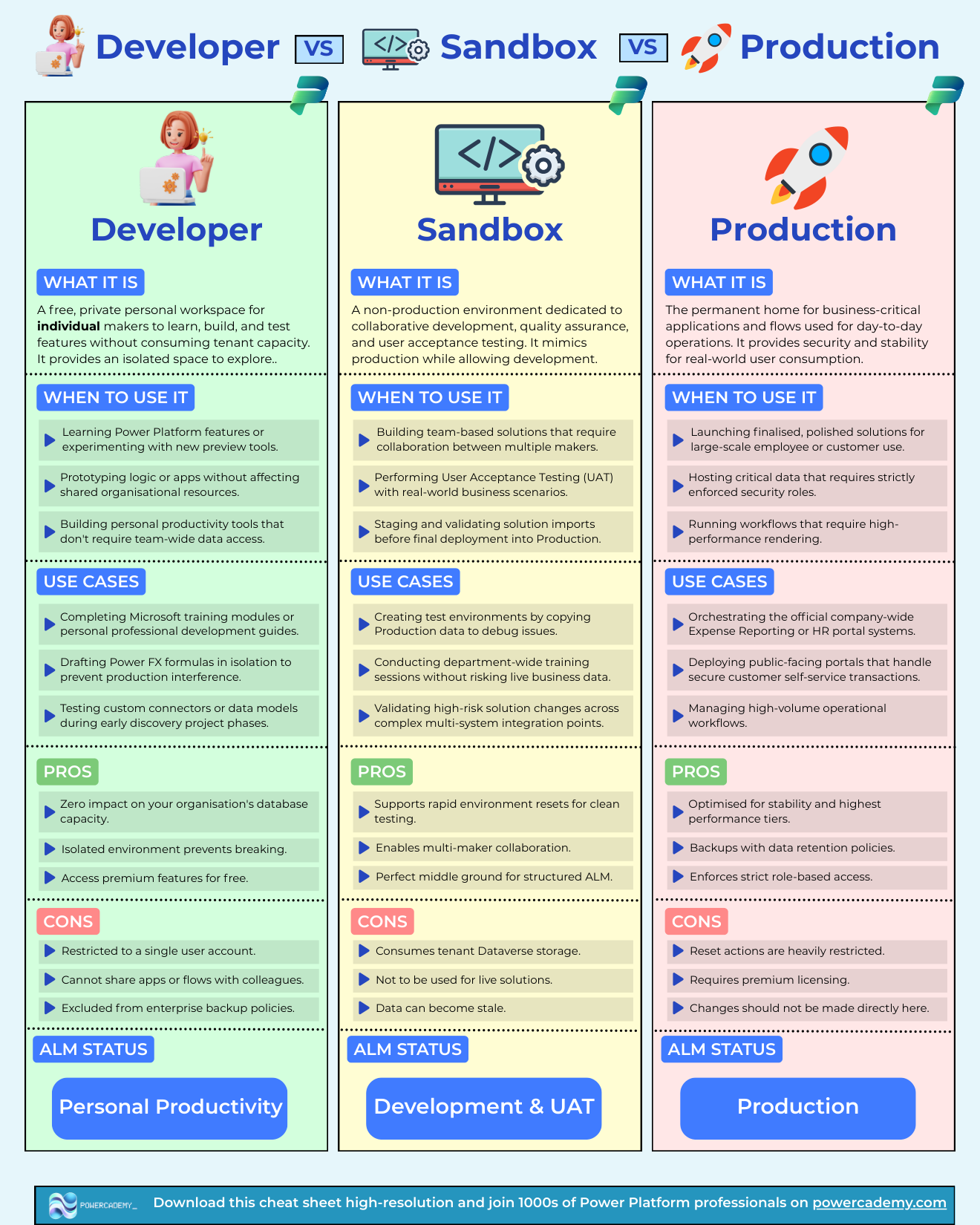
Developer, sandbox, and production environments are not three flavours of the same thing - they are three distinct stages of a delivery pipeline, each with its own rules. Build and learn in developer, collaborate and test in sandbox, run the business in production. This cheat sheet compares all three: what each is for, its pros and cons, and where it sits in your ALM story.
Want the hi-res version? It's free in the Powercademy Success Kit.
What is a developer environment for?
A free, private personal workspace for individual makers to learn, build, and test without consuming tenant capacity. Use it for learning new features, experimenting with preview tools, prototyping logic in isolation, personal productivity tools, training modules, and testing custom connectors or data models during early discovery. The pros: zero impact on your organisation's database capacity, isolation that prevents breaking anything shared, and free access to premium features. The cons: it is restricted to a single user account, you cannot share apps or flows with colleagues, and it is excluded from enterprise backup policies.
What is a sandbox environment for?
A non-production environment dedicated to collaborative development, quality assurance, and user acceptance testing. Use it for team-based solutions with multiple makers, UAT with real-world business scenarios, staging and validating solution imports before production deployment, debugging against a copy of production data, department-wide training, and validating high-risk changes across complex integrations. The pros: rapid environment resets for clean testing, multi-maker collaboration, and a perfect middle ground for structured ALM. The cons: it consumes tenant Dataverse storage, must never host live solutions, and its data can become stale.
What is a production environment for?
The live tier: finalised solutions for large-scale employee or customer use, critical data behind strictly enforced security roles, high-performance workflows, company-wide systems like expense reporting or HR portals, and public-facing portals handling secure self-service transactions. It is optimised for stability and the highest performance tiers, backed up with data retention policies, and locked down with strict role-based access. Reset actions are heavily restricted, premium licensing is required, and the golden rule applies: changes should never be made directly here - they arrive through the pipeline as managed solutions.
FAQ
Are developer environments really free?
Yes - the Power Apps Developer Plan gives each maker a personal environment with Dataverse and premium features at no cost, and it does not consume tenant database capacity. The trade-off is that it is single-user and outside enterprise backup policies.
Can I copy production data into a sandbox?
Yes - copying production to a sandbox is a standard pattern for debugging issues against realistic data and validating changes safely. Treat the copy with production-level care though: the data is just as sensitive there as in the source.
Why should changes never be made directly in production?
Direct edits bypass testing, break the managed-solution layering that makes deployments repeatable, and create drift between environments that gets harder to fix every week it persists. Everything reaches production through a solution import or pipeline - no exceptions is the cheapest policy.
How many environments does a typical organisation need?
The baseline is one production, at least one sandbox for testing and UAT, and a personal developer environment per maker. Larger organisations add more sandboxes per project or department, but the three-tier shape stays the same.
The hi-res version is in the Powercademy Success Kit - free, along with hundreds of other cheat sheets, roadmaps, and guides for Microsoft professionals.