The Power Platform ALM Cheat Sheet

Howdang Rashid
Saturday, 22 August 2026 · 3 min read
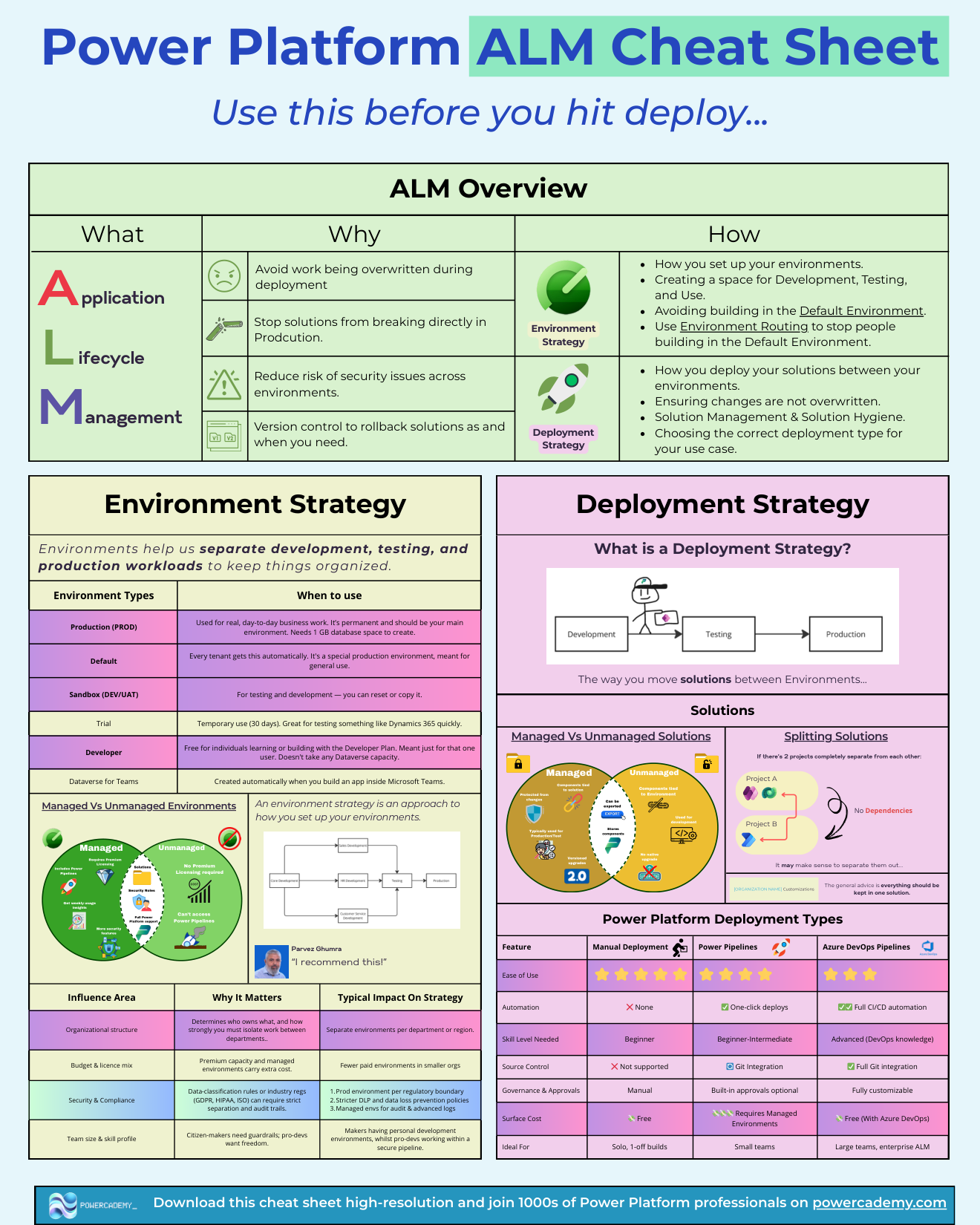
Power Platform ALM comes down to three decisions: which environments you run, whether solutions travel managed or unmanaged, and how deployments happen. This cheat sheet puts all three on one page - every environment type and when to use it, the managed vs unmanaged split, the deployment options compared, and the organisational factors that shape the strategy.
Want the hi-res version? It's free in the Powercademy Success Kit.
What are the Power Platform environment types?
Production - Real, day-to-day business work. Permanent, your main environment; needs 1 GB of database capacity to create.
Default - Every tenant gets one automatically. A special production environment meant for general use - and the place ungoverned sprawl collects if you let it.
Sandbox - Development, testing, and UAT. Resettable and copyable, which production deliberately is not.
Trial - Temporary, 30 days. Great for quickly evaluating something like Dynamics 365.
Developer - Free, single-user environments from the Developer Plan for learning and building. Takes no Dataverse capacity.
Dataverse for Teams - Created automatically when you build an app inside Microsoft Teams.
On top of any of these sits the managed vs unmanaged environment split: Managed Environments require premium licensing but add Power Pipelines, extra security features, and weekly usage insights; unmanaged environments need no premium licensing but cannot access Power Pipelines.
What shapes your environment strategy?
Four organisational factors. Structure: who owns what determines how strongly you isolate work - often separate environments per department or region. Budget and licence mix: premium capacity and Managed Environments carry cost, so smaller organisations run fewer paid environments. Security and compliance: data-classification rules and regulations like GDPR, HIPAA, or ISO can require a production environment per regulatory boundary, stricter DLP policies, and Managed Environments for audit logging. Team profile: citizen makers need guardrails while pro-devs want freedom - the common answer is personal developer environments for makers and a secured pipeline for the pros.
Managed or unmanaged solutions - which and when?
Unmanaged solutions are for development: components stay tied to the environment, everything is editable, and there is no native upgrade path. Managed solutions are for test and production: components are tied to the solution, protected from ad-hoc changes, and upgraded through proper versioned imports. The rule that prevents most ALM pain is one sentence: unmanaged in DEV, managed everywhere else. For deployment itself, the spectrum runs from free manual imports (solo, one-off builds) through Power Pipelines' one-click deploys with optional approvals (small teams, requires Managed Environments) to fully customisable Azure DevOps CI/CD (large teams and enterprise audit requirements).
FAQ
What is the minimum viable ALM setup?
One production environment, one sandbox for test, personal developer environments for makers, and the rule that everything is built in an unmanaged solution and deployed managed. That alone puts you ahead of most tenants.
Can I convert an unmanaged solution to managed?
You export it as managed from the development environment - the unmanaged source stays in DEV as your editable master. What you should not do is import unmanaged solutions into production, because they cannot be cleanly upgraded or removed.
Are Managed Environments the same as managed solutions?
No - unfortunate naming. Managed solutions are a packaging format for deploying components. Managed Environments are a premium governance feature for environments, adding Power Pipelines, security controls, and usage insights. You can use managed solutions without Managed Environments.
Does Dataverse for Teams count as a real environment?
It is a real but limited one: created automatically per team, with a subset of Dataverse capabilities. Solutions that outgrow it can be upgraded to a full Dataverse environment, so treat it as a starting point rather than a destination for business-critical apps.
The hi-res version is in the Powercademy Success Kit - free, along with hundreds of other cheat sheets, roadmaps, and guides for Microsoft professionals.