Manual Deployments vs Power Pipelines vs Azure DevOps: Which Should You Use?

Howdang Rashid
Saturday, 22 August 2026 · 3 min read
There are three ways to move a Power Platform solution from dev to production: export and import it by hand, let the built-in Power Pipelines promote it with approvals and Git integration, or run it through full Azure DevOps CI/CD. The right answer depends on team size, governance needs, and how often you ship. This cheat sheet compares all three so you can pick deliberately instead of defaulting to whatever you did last time.
Want the hi-res version? It's free in the Powercademy Success Kit.
When are manual deployments acceptable?
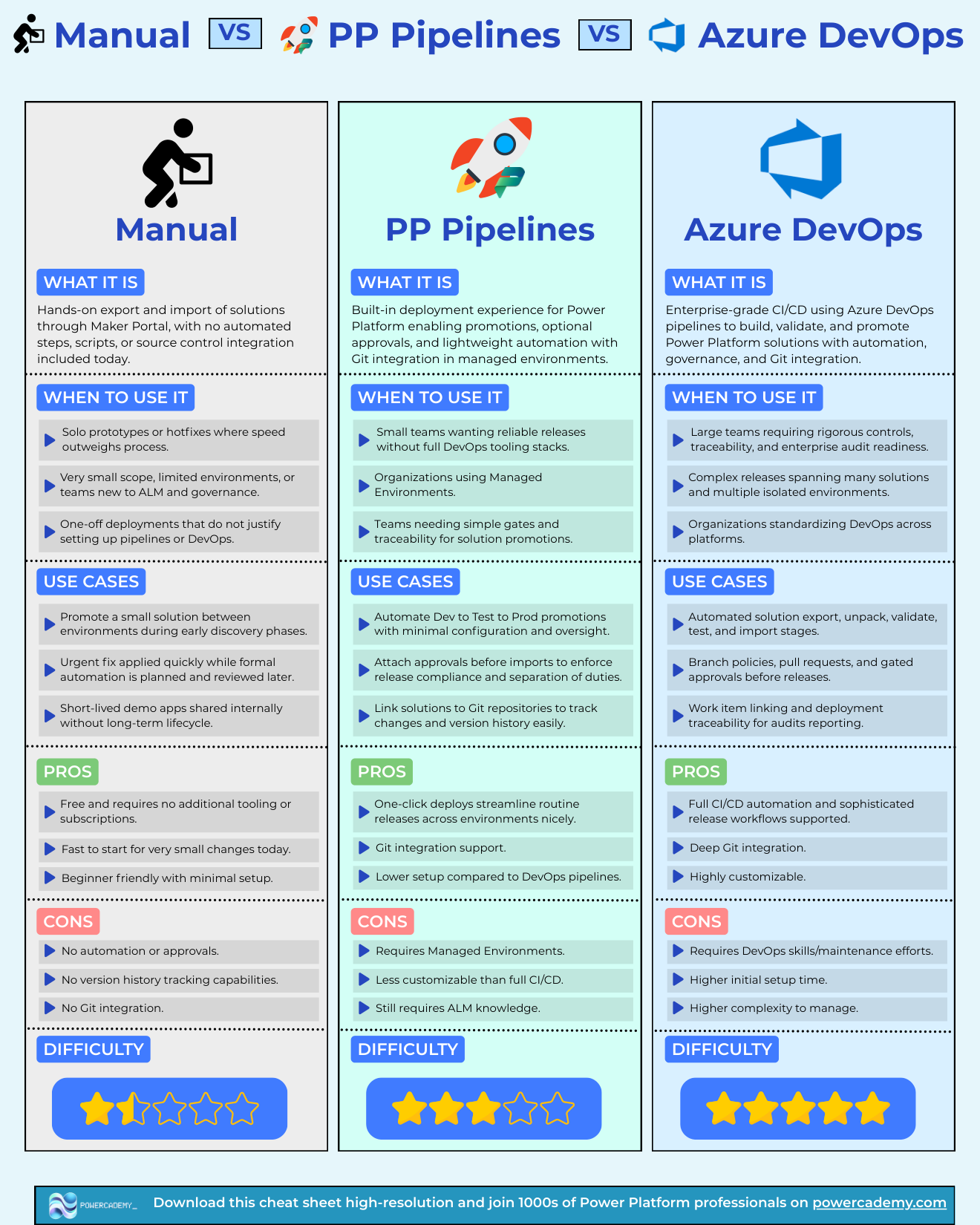
Manual deployment is hands-on export and import through the maker portal - no automation, no scripts, no source control. It is acceptable for solo prototypes, one-off internal demos, urgent hotfixes applied while formal automation is being planned, and teams brand new to ALM promoting a small solution during early discovery. The pros are real: free, fast to start, beginner friendly. So are the cons: no automation or approvals, no version history, no Git integration. The moment a solution matters to more than one person, manual should be a stopgap, not a strategy.
What do Power Pipelines give you?
Power Pipelines are the built-in deployment experience: automated dev-to-test-to-prod promotions with minimal configuration, optional approvals before imports to enforce separation of duties, Git integration to track changes and version history, and one-click deploys for routine releases. They are the sweet spot for small teams that want reliable releases without a full DevOps stack, and for organisations already using Managed Environments - which is also the catch, because Managed Environments (and their premium licensing) are required. Less customisable than full CI/CD, and you still need ALM knowledge, but the setup cost is a fraction of DevOps.
When do you need Azure DevOps pipelines?
When the stakes justify the machinery: large teams needing rigorous controls and enterprise audit readiness, complex releases spanning many solutions and isolated environments, or organisations standardising DevOps across platforms. You get automated export, unpack, validate, test, and import stages; branch policies, pull requests, and gated approvals; work item linking for audit trails; and deep Git integration with full CI/CD customisation. The price is DevOps skills, maintenance effort, higher initial setup time, and more complexity to manage - which is exactly why it is overkill for a two-person team shipping monthly.
FAQ
Can I start with Power Pipelines and move to Azure DevOps later?
Yes, and it is a sensible path. The concepts transfer directly - environments, solutions, approvals, Git - so a team that has run Power Pipelines well adopts DevOps pipelines far faster than one jumping straight from manual.
Do Power Pipelines really require Managed Environments?
Yes - the target environments must be Managed Environments, which carry premium licensing. That cost is the main reason smaller organisations weigh Azure DevOps (free with an Azure DevOps org) despite its higher skill requirement.
Is GitHub Actions an option too?
Yes - the Power Platform build tools have GitHub Actions equivalents, and the comparison mirrors Azure DevOps: full CI/CD flexibility, requires pipeline skills. Choose whichever your organisation already standardises on.
What should a solo maker use?
Manual is defensible for genuinely personal tools, but even solo makers benefit from exporting solutions to Git via the PAC CLI for version history. The habit costs minutes and saves you the day something breaks with no rollback.
The hi-res version is in the Powercademy Success Kit - free, along with hundreds of other cheat sheets, roadmaps, and guides for Microsoft professionals.