Power Automate vs SSIS: Why Big Migrations Break Flows

Howdang Rashid
Saturday, 22 August 2026 · 2 min read
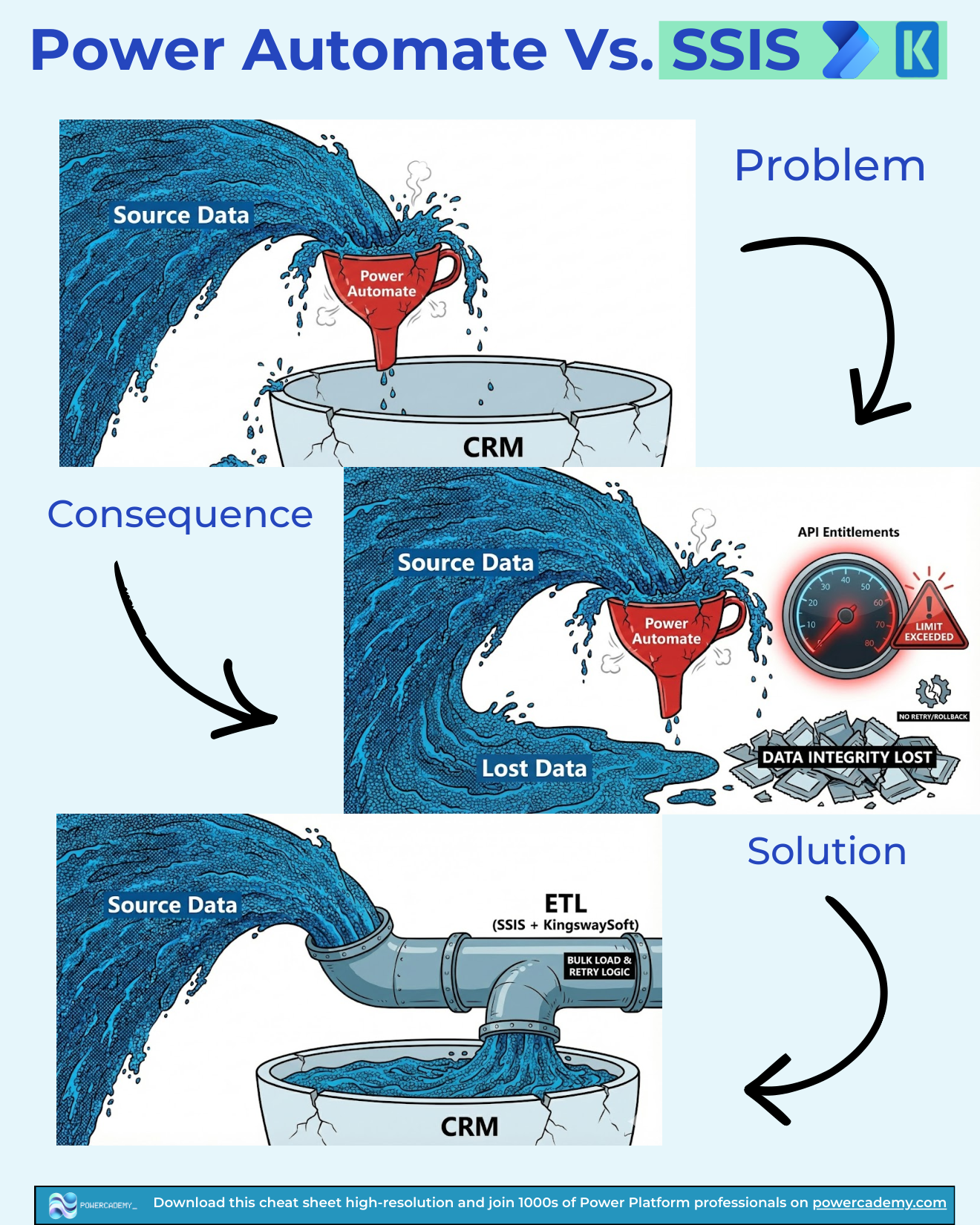
Picture a firehose of source data being poured through a kitchen funnel into your CRM. That's what a migration through Power Automate looks like - and it's one of the most expensive mistakes in the Power Platform. Flows are brilliant at event-driven automation; they are the wrong engine for volume. Here's why, and what to use instead.
Want the hi-res version? It's free in the Powercademy Success Kit.
What's the problem with flows for big data loads?
Power Automate processes records one API call at a time, under per-user API entitlement limits, with connector throttling on top. That's fine for "when a record changes, send an email". Point a migration at it - hundreds of thousands or millions of rows - and you're forcing an ocean through a funnel: slow at best, throttled at worst.
What actually goes wrong?
Three failure modes compound. You exceed API entitlements, so runs start failing or throttling mid-load. There's no bulk retry or rollback - a failure at row 400,000 leaves you half-migrated with no clean way back. And the result is lost data integrity: partial loads, duplicates from re-runs, and no authoritative record of what made it across. The flow didn't fail because it was badly built - it was built on the wrong engine for the volume.
What's the right tool for volume?
ETL - SSIS with the KingswaySoft toolkit for Dataverse. A proper pipeline gives you bulk load with batching, retry logic, error routing, and transformation logic that runs before the data touches your CRM. The picture changes from a funnel to a pipe: source data flows through, cleaned and validated, and arrives complete.
The division of labour is simple: event-driven work belongs in Power Automate; volume-driven work belongs in ETL. Both tools are excellent - at different jobs.
FAQ
Where's the cutoff - how many rows is too many for a flow?
There's no magic number, but once you're looping over thousands of records per run - or the job is a migration rather than a reaction to events - you're in ETL territory. If you're designing batching and retry logic inside a flow, the tool is telling you something.
Can't I just add concurrency and batching to my flow?
You can squeeze more throughput out, but you're still spending API entitlements per record, still without transactional rollback, and now maintaining a complex flow that imitates an ETL tool badly. The effort is better spent building the pipeline properly.
What about dataflows instead of SSIS?
Dataflows handle small-to-medium scheduled imports nicely. For migration-scale volume, complex mapping, deduping, and retry semantics, SSIS + KingswaySoft remains the industry standard for Dataverse.
Does this mean Power Automate is bad at integration?
No - it's excellent at low-volume, event-driven integration: a record syncs when it changes, an approval triggers a downstream update. The failure mode is only when volume workloads get forced through an event-driven engine.
The hi-res version of this cheat sheet is in the Powercademy Success Kit - free, along with hundreds of other cheat sheets, roadmaps, and guides for Microsoft professionals.