Power Apps Code Apps: What Developers Need to Know

Howdang Rashid
Saturday, 22 August 2026 · 2 min read
If you're a web developer eyeing the Power Platform, code apps are your door in: build with React, Vue, and TypeScript, host on the platform, and reach 1,500+ connectors - without owning auth, hosting, or CI/CD plumbing. Here's how they compare to the alternatives and the four stages from zero to deployed.
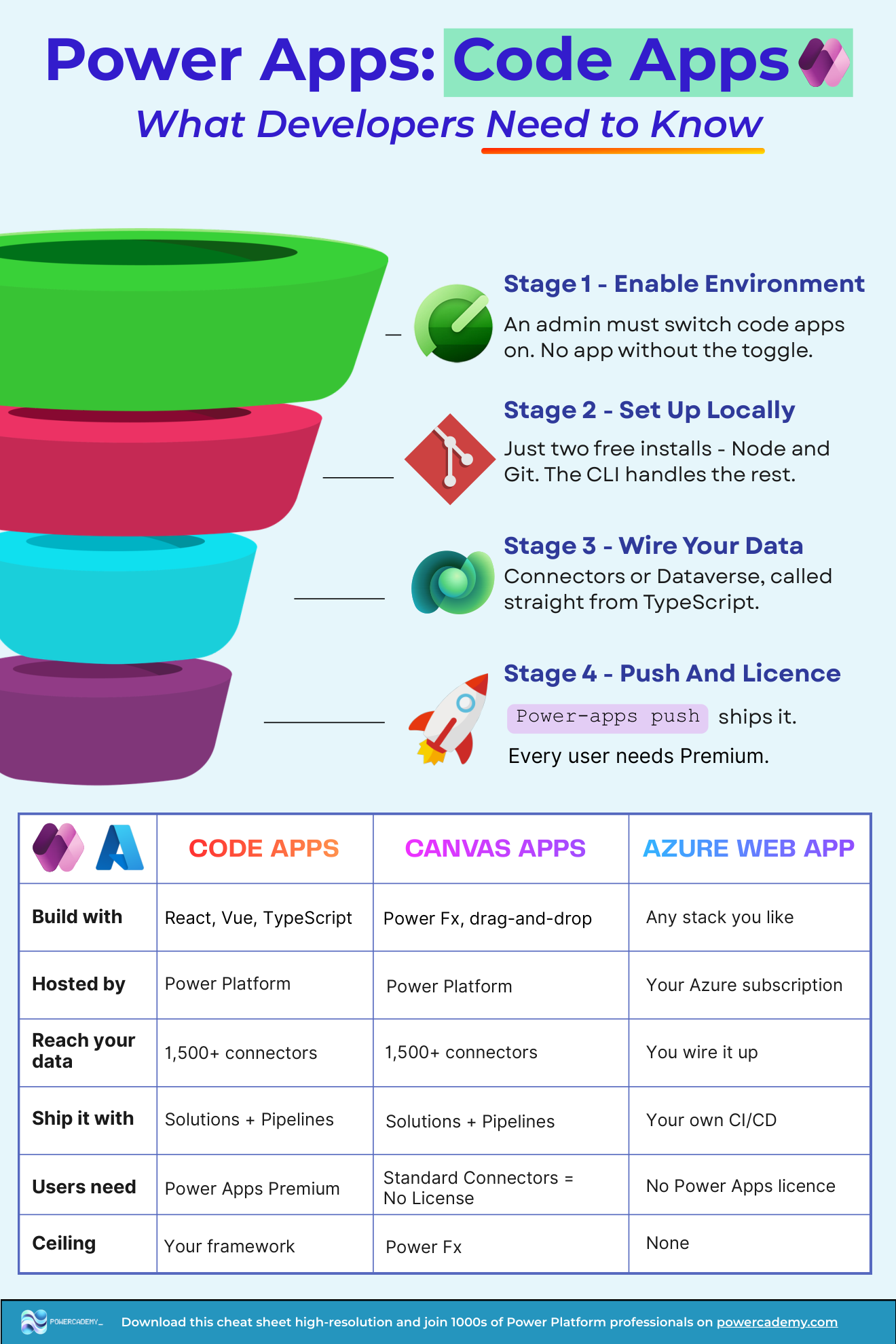
Want the hi-res version? It's free in the Powercademy Success Kit.
How do code apps compare to the alternatives?
Code Apps | Canvas Apps | Azure Web App | |
|---|---|---|---|
Build with | React, Vue, TypeScript | Power Fx, drag-and-drop | Any stack you like |
Hosted by | Power Platform | Power Platform | Your Azure subscription |
Reach your data | 1,500+ connectors | 1,500+ connectors | You wire it up |
Ship it with | Solutions + pipelines | Solutions + pipelines | Your own CI/CD |
Users need | Power Apps Premium | No licence on standard connectors | No Power Apps licence |
Ceiling | Your framework | Power Fx | None |
How do you get from zero to deployed?
Enable the environment. An admin must switch code apps on - no app without the toggle.
Set up locally. Two free installs - Node and Git - and the CLI handles the rest.
Wire your data. Connectors or Dataverse, called straight from TypeScript via generated typed services.
Push and licence. One
pac code pushships it; every user needs a Premium licence.
FAQ
Why not just build the Azure web app?
Roughly thirty hours of plumbing per app: OAuth and Entra setup, CRUD middleware and API security, hosting config and DevOps. Code apps inherit all of it - the honest comparison is total cost of ownership, not hosting elegance.
Does every user really need Premium?
Yes - code apps are part of the Premium ecosystem. For orgs already licensing Dataverse it's a non-event; for external-facing apps, look at Power Pages or a plain web app instead.
Can I use my existing React components?
Yes - it's a real single-page app: your components, your libraries, your state management. The SDK adds the platform bridge (auth, connectors, Dataverse) rather than replacing your stack.
How do code apps ship through environments?
The Power Platform way: solutions and pipelines with connection references, same as the rest of your estate - which is precisely the governance win over ad hoc web apps.
The hi-res version is in the Powercademy Success Kit - free, along with hundreds of other cheat sheets, roadmaps, and guides for Microsoft professionals.