The Power Apps Code Apps Learning Roadmap: 9 Steps

Howdang Rashid
Saturday, 22 August 2026 · 3 min read
Code apps are the newest Power Apps discipline, and there's no beaten path yet - so here's one. Nine steps take you from "where do these even fit" through the web stack and SDK to shipping safely into production, in the order where each step makes the next easier.
Want the hi-res version with clickable resources? It's free in the Powercademy Success Kit.
What are the foundations?
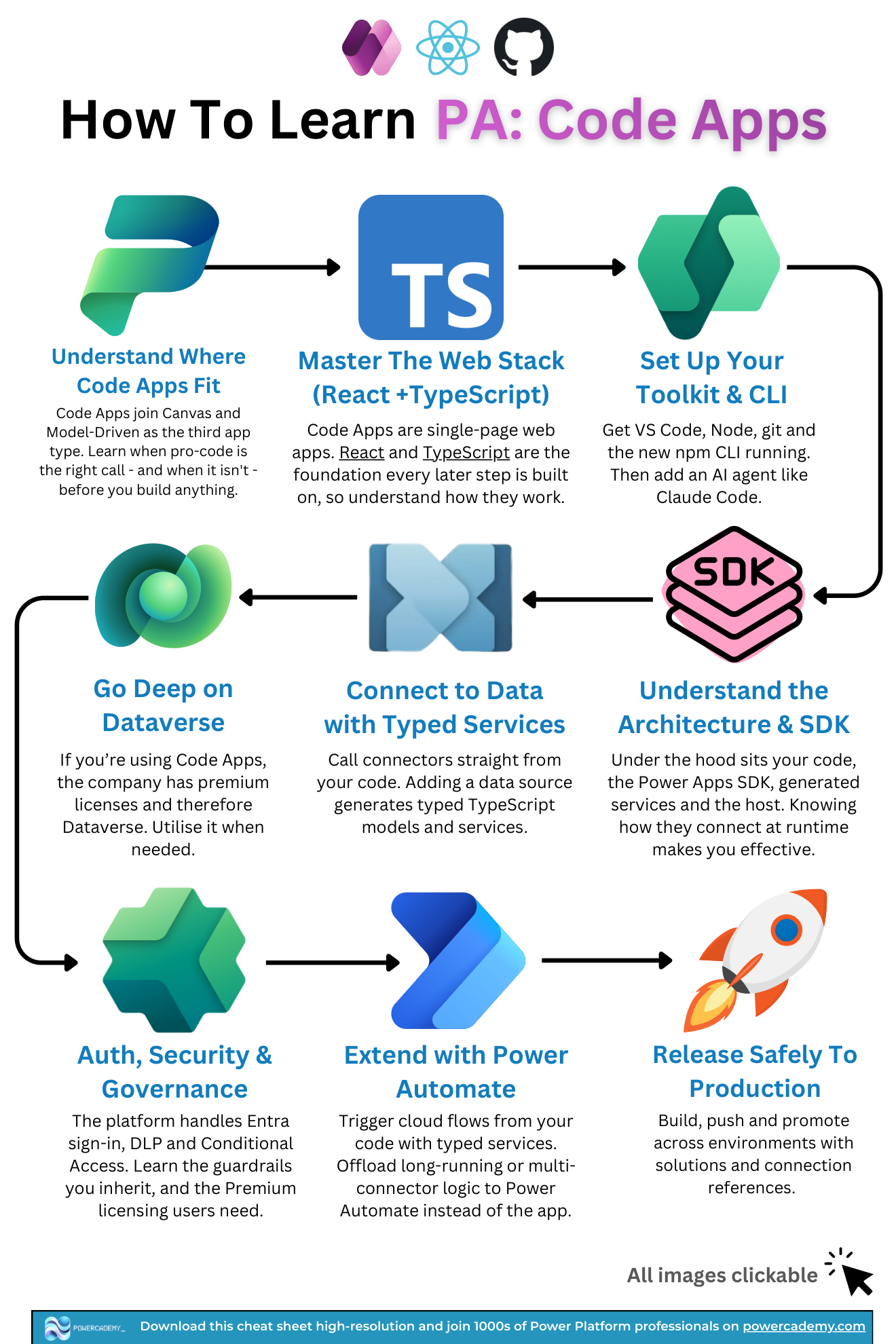
Understand where code apps fit. They join canvas and model-driven as the third app type. Learn when pro-code is the right call - and when it isn't - before building anything.
Master the web stack (React + TypeScript). Code apps are single-page web apps; React and TypeScript are the foundation every later step builds on.
Set up your toolkit and CLI. VS Code, Node, git, and the npm CLI - then add an AI agent like Claude Code, because AI-assisted building is how this discipline actually gets done in 2026.
How do you build for real?
Understand the architecture and SDK. Under the hood sit your code, the Power Apps SDK, generated services, and the host - knowing how they connect at runtime is what makes you effective.
Connect to data with typed services. Adding a data source generates typed TypeScript models and services, so you call connectors straight from code with IntelliSense on your side.
Go deep on Dataverse. If your org runs code apps, it has Premium licensing - and therefore Dataverse. Use it when the data is relational and governed.
Extend with Power Automate. Trigger cloud flows from code with typed services, and offload long-running or multi-connector logic to flows instead of the app.
What makes it enterprise-grade?
Auth, security, and governance. The platform handles Entra sign-in, DLP, and Conditional Access - learn the guardrails you inherit and the Premium licensing your users need.
Release safely to production. Build, push, and promote across environments with solutions and connection references - the same ALM story as the rest of the platform.
FAQ
Can a low-code maker realistically learn code apps?
Yes - your platform knowledge (Dataverse, connectors, ALM) covers half the roadmap already. The genuine investment is step 2: a few months of real React and TypeScript. AI assistants shrink the gap but don't remove the need to read what they write.
Why is an AI agent part of the toolkit step?
Because code apps arrived in the AI-first era: scaffolding, typed-service wiring, and component work are exactly what Claude Code and Copilot accelerate. Learning the discipline WITH an agent is learning it as it will actually be practised.
When should logic live in a flow instead of the app?
When it's long-running, touches several connectors, or should survive the user closing the tab. The app owns the experience; flows own the orchestration - the typed-service bridge makes the split clean.
How long does this roadmap take?
With React basics in hand: a focused month to a first production-quality app. From scratch: budget a quarter, with step 2 taking half of it. Either way, build one real app through all nine steps rather than sampling tutorials.
The hi-res version is in the Powercademy Success Kit - free, along with hundreds of other cheat sheets, roadmaps, and guides for Microsoft professionals.