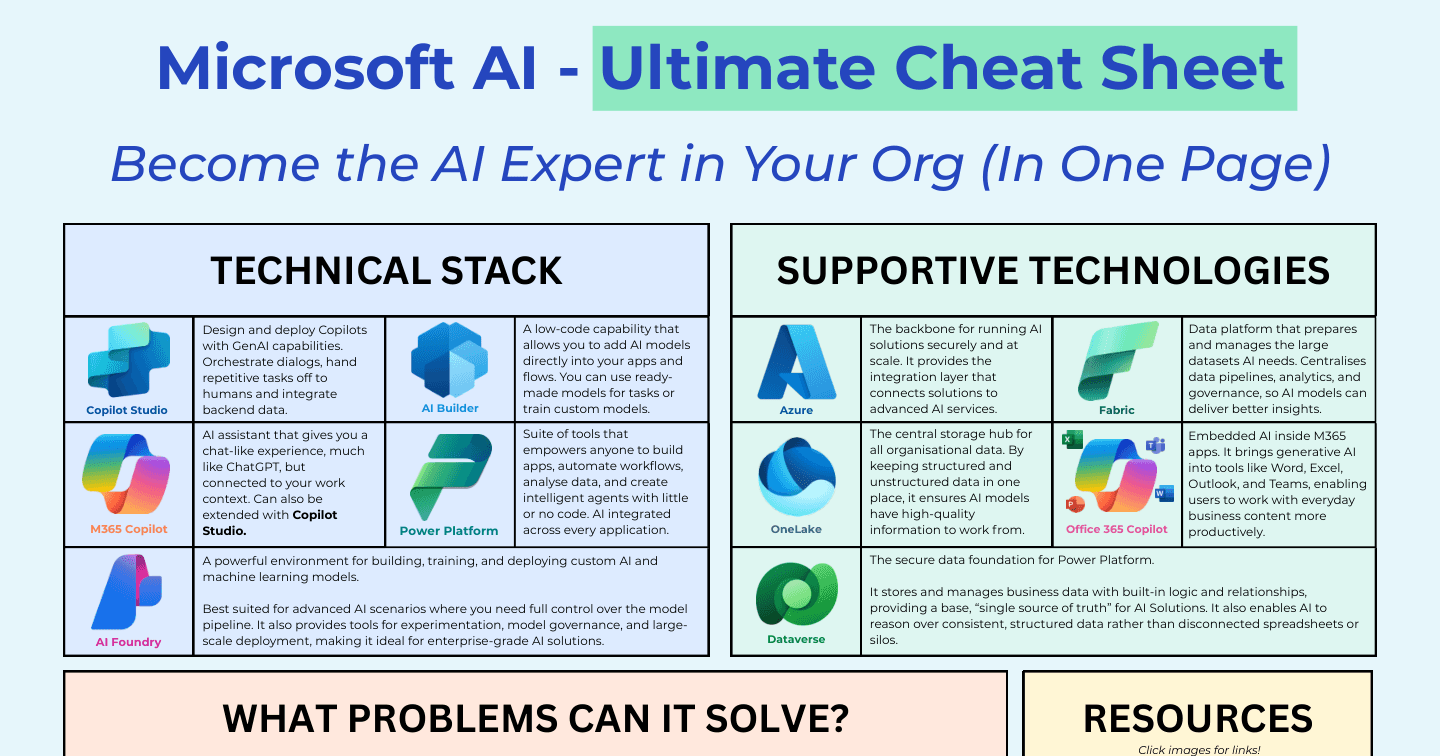
The Ultimate Microsoft AI Cheat Sheet: Strategy, Stack, and Services

Howdang Rashid
Saturday, 22 August 2026 · 3 min read
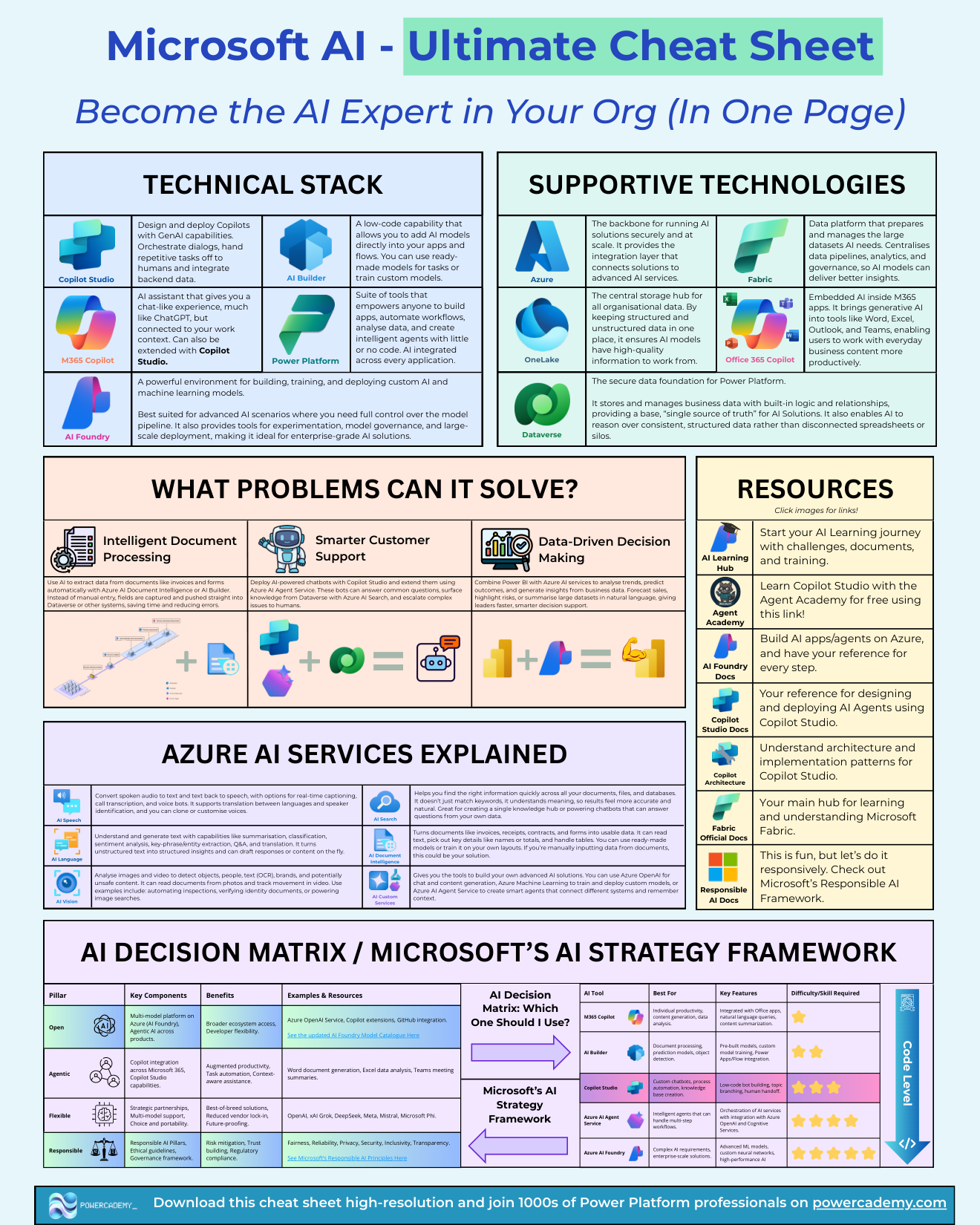
If you need one reference that explains how Microsoft thinks about AI - the strategy, the technical stack, and which tool solves which problem - this is it. The framework below runs on four strategic pillars, a tool decision matrix, and the supporting Azure services, so you can hold the whole estate in your head at once.
Want the hi-res version with clickable resources? It's free in the Powercademy Success Kit.
What are the four pillars of Microsoft's AI strategy?
Open. A multi-model platform on Azure through Microsoft Foundry, with agentic AI across products. That means broader ecosystem access and developer flexibility - Azure OpenAI Service, Copilot extensions, GitHub integration, and a model catalogue that keeps growing.
Agentic. Copilot integration across Microsoft 365 plus Copilot Studio's build capabilities: augmented productivity, task automation, and context-aware assistance - from Word document generation to Excel analysis and Teams meeting summaries.
Flexible. Strategic partnerships and multi-model support - OpenAI, xAI Grok, DeepSeek, Meta, Mistral, and Microsoft's own Phi models. The benefits are best-of-breed solutions, reduced vendor lock-in, and future-proofing.
Responsible. The Responsible AI pillars - fairness, reliability, privacy, security, inclusivity, transparency - backed by ethical guidelines and a governance framework. This is what turns AI adoption into something regulators and boards can sign off.
Which tool solves which problem?
The decision matrix maps five tools to their jobs: M365 Copilot for individual productivity and content generation; AI Builder for document processing, prediction, and object detection inside the Power Platform; Copilot Studio for custom agents, process automation, and knowledge bases; Azure AI Agent Service for intelligent agents orchestrating multi-step workflows; and Microsoft Foundry for complex, enterprise-scale AI with custom models. Difficulty scales in that order - from "just use it" to code-level engineering.
How do the pieces fit together?
Read the sheet top-down: strategy pillars explain why Microsoft builds what it builds, the decision matrix tells you which tool fits your problem, and the Azure AI services underneath (speech, vision, language, search) are the how behind all of it. When a new Microsoft AI product launches, place it against a pillar and a matrix row and it stops being confusing.
FAQ
Why does Microsoft support competitor models like Grok and DeepSeek?
The Flexible pillar is deliberate strategy: Azure wins whichever model wins. For you it means choosing the best model per workload from one platform, with one security and billing story.
Where should a business start with this sheet?
Bottom-left of the matrix: M365 Copilot for user productivity, then AI Builder or Copilot Studio for your first built solution. Save the Azure services for when a real requirement demands them.
Do the Responsible AI pillars actually affect day-to-day builds?
Increasingly, yes: content filters, evaluators, DLP integration, and audit trails are how those principles show up in Copilot Studio and Foundry. Building with them from day one is much cheaper than retrofitting for a compliance review.
How current does a sheet like this stay?
Product names move fast; the structure doesn't. Pillars and problem-categories have been stable for years - map each announcement to its slot and the sheet keeps working.
The hi-res version of this cheat sheet is in the Powercademy Success Kit - free, along with hundreds of other cheat sheets, roadmaps, and guides for Microsoft professionals.