M365 Copilot vs Copilot Cowork vs Microsoft Scout: Microsoft's Three AI Layers Explained

Howdang Rashid
Saturday, 22 August 2026 · 4 min read
Microsoft's AI story in 2026 is best understood as three layers. M365 Copilot is the thinking layer - it reasons and drafts with you in a conversation. Copilot Cowork is the action layer - you describe an outcome and it does the multi-step work inside Microsoft 365. Microsoft Scout is the desktop layer - an agent that acts on your actual machine: local files, shell, browser, and dev tools. Knowing which layer a task belongs to is the whole game.
The comparison on one page:
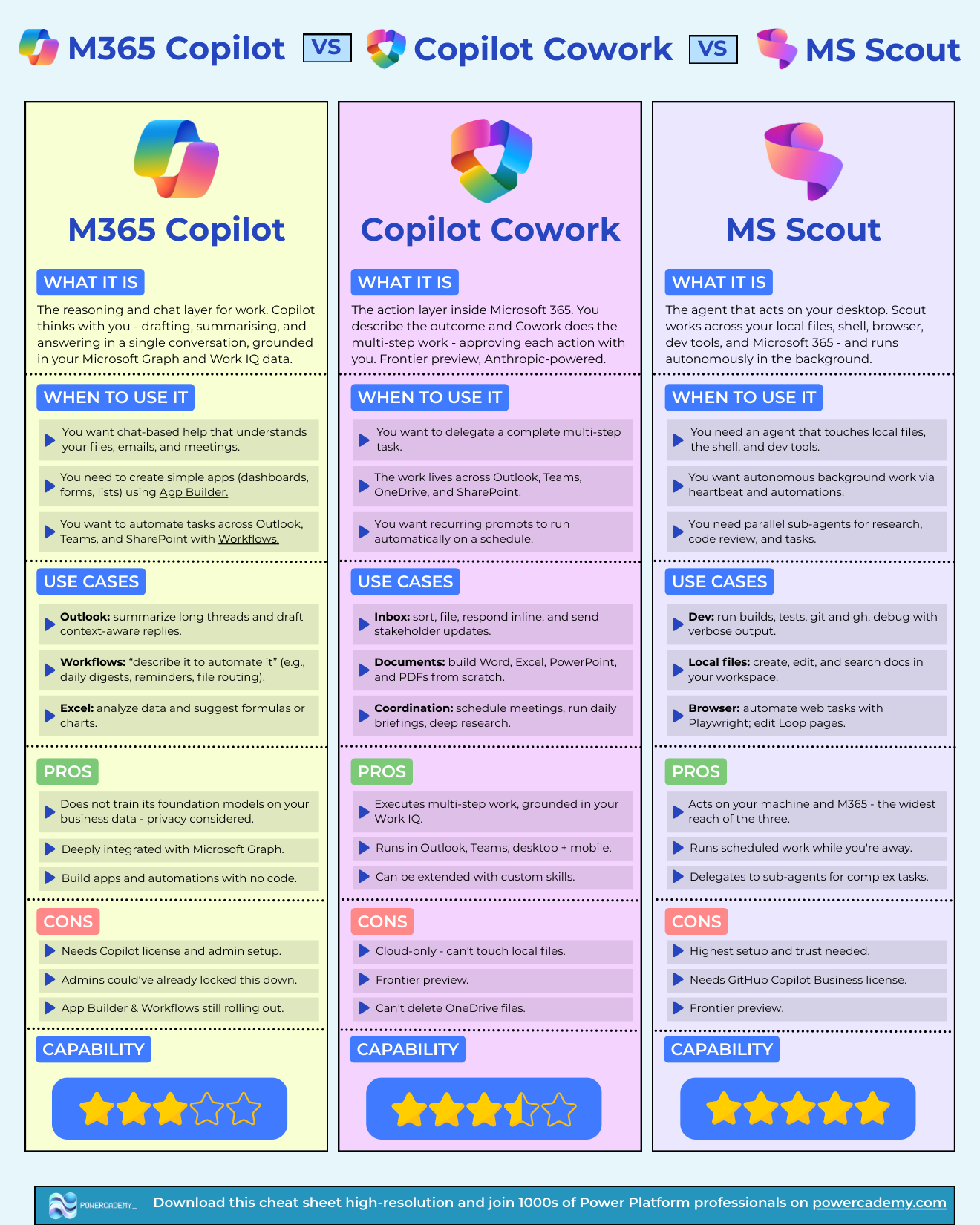
Want the hi-res version? It's free in the Powercademy Success Kit, along with hundreds of other Microsoft AI resources.
What's the difference at a glance?
M365 Copilot | Copilot Cowork | Microsoft Scout | |
|---|---|---|---|
Layer | Thinking - chats and reasons with you | Action - executes multi-step work in the cloud | Desktop - acts on your machine and M365 |
Best for | Chat help over files, emails, meetings; simple apps and automations | Delegating complete tasks across Outlook, Teams, OneDrive, SharePoint | Local files, shell, dev tools, autonomous background work |
Watch out for | Licence + admin setup; features still rolling out | Cloud-only, frontier preview, can't touch local files | Highest setup and trust; needs GitHub Copilot Business |
Capability | 3 / 5 | 3.5 / 5 | 5 / 5 |
When should you use M365 Copilot?
M365 Copilot is the reasoning and chat layer for work: it thinks with you, drafting, summarising, and answering in a single conversation, grounded in your Microsoft Graph and Work IQ data. It's the right layer when you want help that understands your files, emails, and meetings - summarising long Outlook threads, analysing data in Excel, or building simple apps and automations with App Builder and Workflows.
Its strengths: deep Microsoft Graph integration, app and automation building with no code, and a privacy posture where your business data doesn't train the foundation models. Its limits: it needs a Copilot licence and admin setup, admins may have locked features down, and App Builder and Workflows are still rolling out.
When should you use Copilot Cowork?
Copilot Cowork is the action layer inside Microsoft 365 - describe the outcome, and Cowork does the multi-step work, approving each action with you. It's currently a frontier preview, and notably it's Anthropic-powered.
Use it when the work spans Outlook, Teams, OneDrive, and SharePoint: sorting and answering an inbox, building Word, Excel, PowerPoint, and PDF documents from scratch, scheduling meetings, running daily briefings, or setting recurring prompts to run automatically on a schedule. It executes grounded in your Work IQ, runs on desktop and mobile, and can be extended with custom skills.
Its limits: it's cloud-only, so it can't touch local files, it can't delete OneDrive files, and as a frontier preview its capabilities are still expanding.
When should you use Microsoft Scout?
Microsoft Scout is the agent that acts on your desktop. It works across local files, the shell, your browser, dev tools, and Microsoft 365 - and it runs autonomously in the background via heartbeat and scheduled automations, delegating to parallel sub-agents for research, code review, and complex tasks.
It shines for developer work (builds, tests, git, debugging), local file management, and browser automation with Playwright. It has the widest reach of the three - and correspondingly the highest setup and trust requirements, plus a GitHub Copilot Business licence.
How do you choose between them?
Ask where the work lives and who should drive:
You drive, AI advises → M365 Copilot
AI drives inside Microsoft 365, you approve → Copilot Cowork
AI drives on your machine, including code and local files → Microsoft Scout
In practice you'll use all three: Copilot for thinking, Cowork for cloud delegation, Scout for the desktop. They're layers of one stack, not competitors.
FAQ
Is Copilot Cowork replacing M365 Copilot?
No - they're complementary layers. Copilot is the conversation you have; Cowork is the work you hand off. Microsoft positions them together, and Cowork is grounded in the same Work IQ context Copilot uses.
What does "Anthropic-powered" mean for Cowork?
Cowork's frontier preview runs on Anthropic's Claude models rather than solely OpenAI's - part of Microsoft's move to a multi-model AI stack, picking the best model for each workload.
Can Scout and Cowork work together?
They cover different territory today - Cowork in the Microsoft 365 cloud, Scout on your desktop with M365 reach. Many workflows will span both: Scout preparing local artifacts, Cowork handling the cloud-side coordination.
What licences do I need?
M365 Copilot and Cowork sit on Microsoft 365 Copilot licensing (Cowork in frontier preview); Scout requires GitHub Copilot Business. Admin enablement matters as much as licensing - check what your tenant has switched on.
The hi-res, printable version of this comparison is in the Powercademy Success Kit - free, along with hundreds of other cheat sheets, roadmaps, and guides for Microsoft professionals.