How to Use Copilot Like a Power User: 13 Features Most People Miss

Howdang Rashid
Saturday, 22 August 2026 · 3 min read
Most Copilot users live in chat and never discover the rest. Power users work differently: they build living pages, spin up small apps, delegate research to specialist agents, and turn documents into podcasts for the commute. These are the thirteen features that make the difference - what each does, when to use it, and why it earns a place in your week.
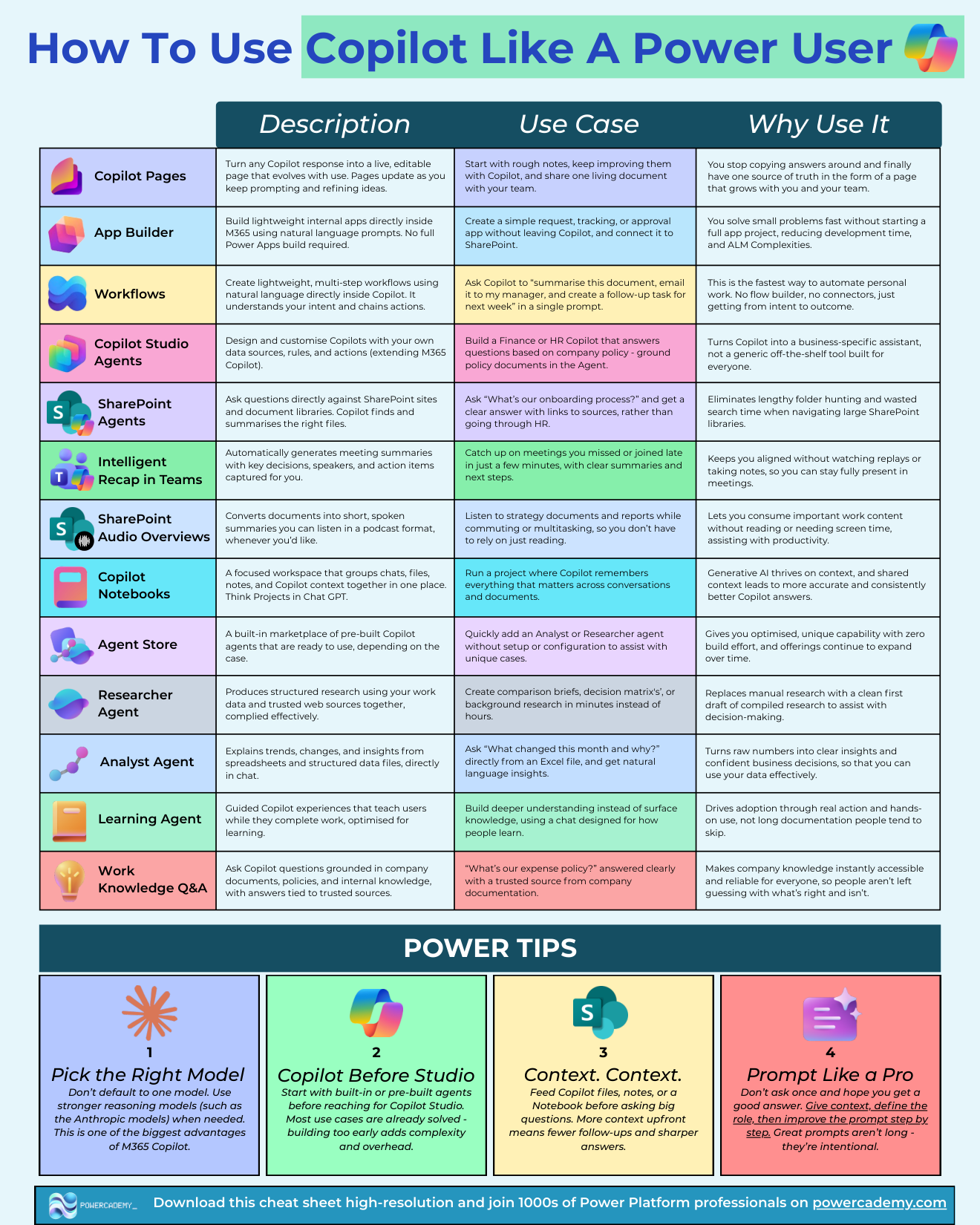
Want the hi-res version? It's free in the Powercademy Success Kit.
What are the workspace features?
Copilot Pages turn any response into a live, editable page that evolves as you keep prompting - one source of truth instead of answers copied around. Copilot Notebooks group chats, files, notes, and context in one focused workspace (think Projects in ChatGPT) - shared context means consistently better answers. Work knowledge Q&A answers questions grounded in company documents and policies, with trusted sources cited - "what's our expense policy?" answered properly.
What can you build without leaving Copilot?
App Builder creates lightweight internal apps from natural language - request, tracking, or approval apps connected to SharePoint, no full Power Apps project or ALM overhead. Workflows chain multi-step automations from a single prompt ("summarise this document, email it to my manager, create a follow-up task") - the fastest route from intent to outcome. Copilot Studio agents extend M365 Copilot with your own data, rules, and actions - a Finance or HR copilot grounded in company policy. SharePoint agents answer questions directly against sites and libraries, ending the folder hunt.
Which specialist agents should you know?
The Agent Store is a built-in marketplace of prebuilt agents ready to use with zero build effort. The three to start with: Researcher produces structured research from your work data and trusted web sources - comparison briefs and decision matrices in minutes; Analyst explains trends and changes in spreadsheets in natural language ("what changed this month and why?"); and the Learning agent teaches users while they work, driving adoption through action rather than documentation.
What are the consumption superpowers?
Intelligent recap in Teams generates meeting summaries with decisions, speakers, and action items - catch up on missed meetings in minutes and stay present in the ones you attend. SharePoint audio overviews convert documents into short spoken summaries - strategy papers as podcasts for the commute.
What are the power tips?
Pick the right model. Don't default to one - use stronger reasoning models (such as the Anthropic models) when the task needs it. This is one of M365 Copilot's biggest advantages.
Copilot before Studio. Start with built-in and prebuilt agents before reaching for Copilot Studio - most use cases are already solved, and building too early adds complexity.
Context, context, context. Feed Copilot files, notes, or a Notebook before asking big questions - more context upfront, better answers out.
FAQ
App Builder or a real Power Apps build - where's the line?
App Builder is for lightweight, personal-to-team apps solved fast without ALM complexity. The moment you need Dataverse, environments, security roles, or multi-team ownership, it's a Power Apps project.
Are the Agent Store agents safe to use with company data?
They run inside your tenant's Copilot boundary with your permissions - Researcher and Analyst only see what you can see. Admins control which agents are available in the store.
What's the practical difference between Pages and Notebooks?
A Notebook is the workspace (context in); a Page is the living deliverable (output out). Power users run a Notebook per project and graduate its best answers into Pages the team shares.
Where does Cowork fit with all of this?
These features make YOU faster in the moment; Cowork does whole tasks for you in the background. Learn these first - they teach you what good context and briefs look like, which is exactly what Cowork rewards.
The hi-res version of this cheat sheet is in the Powercademy Success Kit - free, along with hundreds of other cheat sheets, roadmaps, and guides for Microsoft professionals.