How to Master Copilot Cowork: Setup, Skills, and the 5 Capabilities

Howdang Rashid
Saturday, 22 August 2026 · 3 min read
Copilot Cowork is now generally available - the M365 agent that takes action across Outlook, Word, Excel, PowerPoint, Teams, and Calendar, powered by Anthropic's Claude models as a Microsoft subprocessor. For Microsoft partners, it changes the "what does Copilot actually do" conversation: you're now selling action, not just answers. Here's how to master it - capabilities ranked by maturity, the tenant setup, and the adoption sequence that actually works.
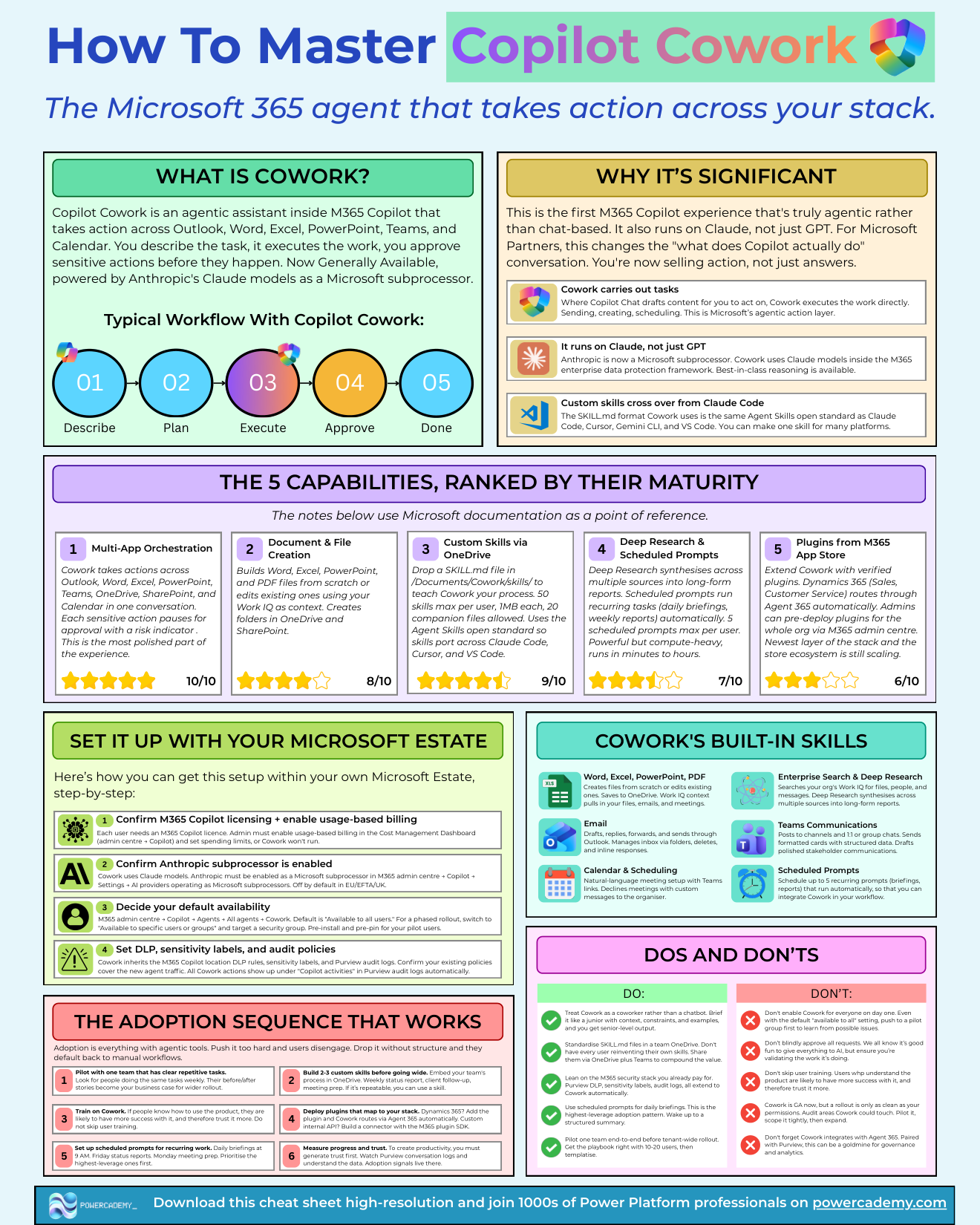
Want the hi-res version? It's free in the Powercademy Success Kit.
Why is Cowork significant?
Three shifts.
Cowork carries out tasks - where Copilot Chat drafts content for you to act on, Cowork executes directly: sending, creating, scheduling.
It runs on Claude, not just GPT - Anthropic is a Microsoft subprocessor, bringing best-in-class reasoning inside the M365 enterprise data protection framework. And custom skills cross over - the SKILL.md format is the same Agent Skills open standard as Claude Code, Cursor, Gemini CLI, and VS Code, so one skill serves many platforms.
What are the five capabilities, ranked by maturity?
Multi-app orchestration - the most polished part: actions across Outlook, Word, Excel, PowerPoint, Teams, OneDrive, SharePoint, and Calendar in one conversation, with every sensitive action pausing for approval with a risk indicator.
Document and file creation - Word, Excel, PowerPoint, and PDF files from scratch or edited, using your Work IQ as context, with folder creation in OneDrive and SharePoint.
Custom skills via OneDrive - drop a SKILL.md in /Documents/Cowork/skills/ to teach Cowork your process. 50 skills max per user, 1MB each, 20 companion files - and the open standard means they port to Claude Code, Cursor, and VS Code.
Deep research and scheduled prompts - long-form synthesis across sources, plus up to five scheduled prompts per user for recurring briefings and reports. Powerful but compute-heavy: runs take minutes to hours.
Plugins from the M365 app store - verified extensions, with Dynamics 365 routing through Agent 365 automatically and admin pre-deployment for the whole org. The newest layer; the ecosystem is still scaling.
How do you set it up in your tenant?
Licensing and billing: each user needs an M365 Copilot licence, and the admin must enable usage-based billing with spending limits in the Cost Management dashboard - or Cowork won't run.
Enable the Anthropic subprocessor: M365 admin centre → Copilot → Settings → AI providers. Note: it's off by default in the EU, EFTA, and UK.
Decide availability: default is all users; for a phased rollout, target a security group and pre-install and pre-pin for pilots.
Confirm DLP, sensitivity labels, and audit: Cowork inherits your M365 Copilot policies, and every action lands in Purview audit logs under Copilot activities automatically.
FAQ
Why won't Cowork run even though we have Copilot licences?
Almost always one of two switches: usage-based billing isn't enabled (with a spending limit set), or the Anthropic subprocessor is off - which is the default in the EU, EFTA, and UK. Both live in the M365 admin centre under Copilot.
What are the custom skill limits?
50 skills per user, 1MB per SKILL.md, and up to 20 companion files. Plenty for a personal library - and because it's the Agent Skills open standard, the same files work in Claude Code, Cursor, and VS Code.
How do we audit what Cowork did?
Purview - all Cowork actions appear under "Copilot activities" in the audit logs automatically, and your existing DLP and sensitivity-label policies apply to its data flows.
Deep research or a scheduled prompt - which for weekly reporting?
Scheduled prompt: it runs your report automatically each week within your five-prompt allowance. Save deep research for one-off, multi-source investigations where the minutes-to-hours runtime earns its keep.
The hi-res version of this guide is in the Powercademy Success Kit - free, along with hundreds of other cheat sheets, roadmaps, and guides for Microsoft professionals.