How to Learn Copilot Studio: The 10 Building Blocks

Howdang Rashid
Saturday, 22 August 2026 · 3 min read
Copilot Studio looks overwhelming until you realise it's ten building blocks, each with a clear job and a clear audience. Learn what each block is for and when to reach for it, and the product stops being a maze - this is the map I wish I'd had on day one.
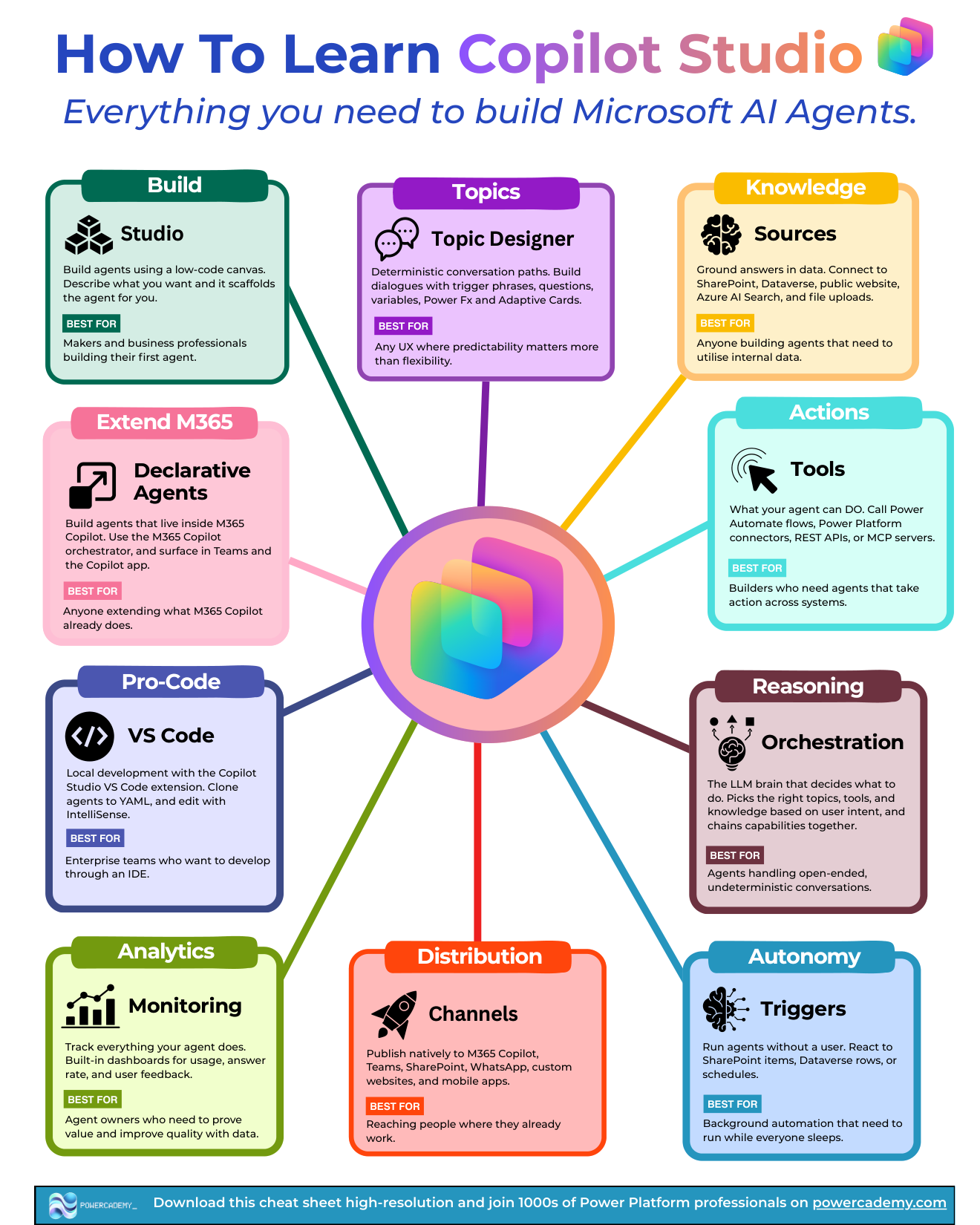
Want the hi-res version? It's free in the Powercademy Success Kit.
What are the building blocks for building?
Studio is the low-code canvas: describe what you want and it scaffolds the agent for you. Best for makers and business professionals building their first agent.
Topics give you deterministic conversation paths - dialogues with trigger phrases, questions, variables, Power Fx, and Adaptive Cards. Best for any UX where predictability matters more than flexibility.
Knowledge grounds answers in data: SharePoint, Dataverse, public websites, Azure AI Search, and file uploads. Best for anyone whose agent needs internal data.
Tools are what your agent can DO - Power Automate flows, connectors, REST APIs, or MCP servers. Best for builders whose agents must take action across systems.
What makes agents intelligent and autonomous?
Orchestration is the LLM brain that decides what to do - picking the right topics, tools, and knowledge from user intent and chaining capabilities together. Best for open-ended, non-deterministic conversations.
Triggers run agents without a user - reacting to SharePoint items, Dataverse rows, or schedules. Best for background automation that runs while everyone sleeps.
How do agents reach people and prove value?
Channels publish natively to M365 Copilot, Teams, SharePoint, WhatsApp, custom websites, and mobile apps - reaching people where they already work.
Analytics track everything your agent does, with built-in dashboards for usage, answer rate, and user feedback. Best for agent owners who need to prove value and improve quality.
Where does it connect to the wider Microsoft world?
Declarative agents live inside M365 Copilot itself - using the M365 Copilot orchestrator and surfacing in Teams and the Copilot app. Best for anyone extending what M365 Copilot already does.
Pro-code is local development with the Copilot Studio VS Code extension: clone agents to YAML and edit with IntelliSense. Best for enterprise teams who want to develop through an IDE with real source control.
FAQ
Which blocks matter most in the new Copilot Studio experience?
Knowledge, Tools, and Orchestration are the heart of the new experience, with Skills and workflows layered on top. Topics are de-emphasised for new builds - learn them for maintenance, not as your starting point.
Do I need the pro-code block if I'm a maker?
Not to build - but knowing it exists matters. When your agent becomes business-critical, the VS Code extension is how it gets source control, code review, and proper ALM. That's the moment maker projects become products.
What's the difference between a declarative agent and a regular Copilot Studio agent?
A declarative agent runs on M365 Copilot's own orchestrator and lives inside the Copilot experience; a regular agent has its own orchestration and publishes to many channels. Extend M365 Copilot when your users live there; build standalone when you need your own surface or external reach.
Which channels should I publish to first?
Teams for internal agents - zero adoption friction where people already work. Custom website for external ones. Add more channels once analytics prove the agent earns its place.
The hi-res version of this cheat sheet is in the Powercademy Success Kit - free, along with hundreds of other cheat sheets, roadmaps, and guides for Microsoft professionals.