Every Microsoft AI Agent Worth Knowing in 2026 (All 20, Explained)

Howdang Rashid
Saturday, 22 August 2026 · 4 min read
Microsoft now ships AI agents for almost everything: agents that research, agents that build apps, agents that qualify sales leads, and agents that manage other agents. The hard part is knowing which ones exist and which ones matter for you. This guide covers the 20 Microsoft AI agents worth knowing in 2026 - what each one does, in plain English.
All 20 on one page:
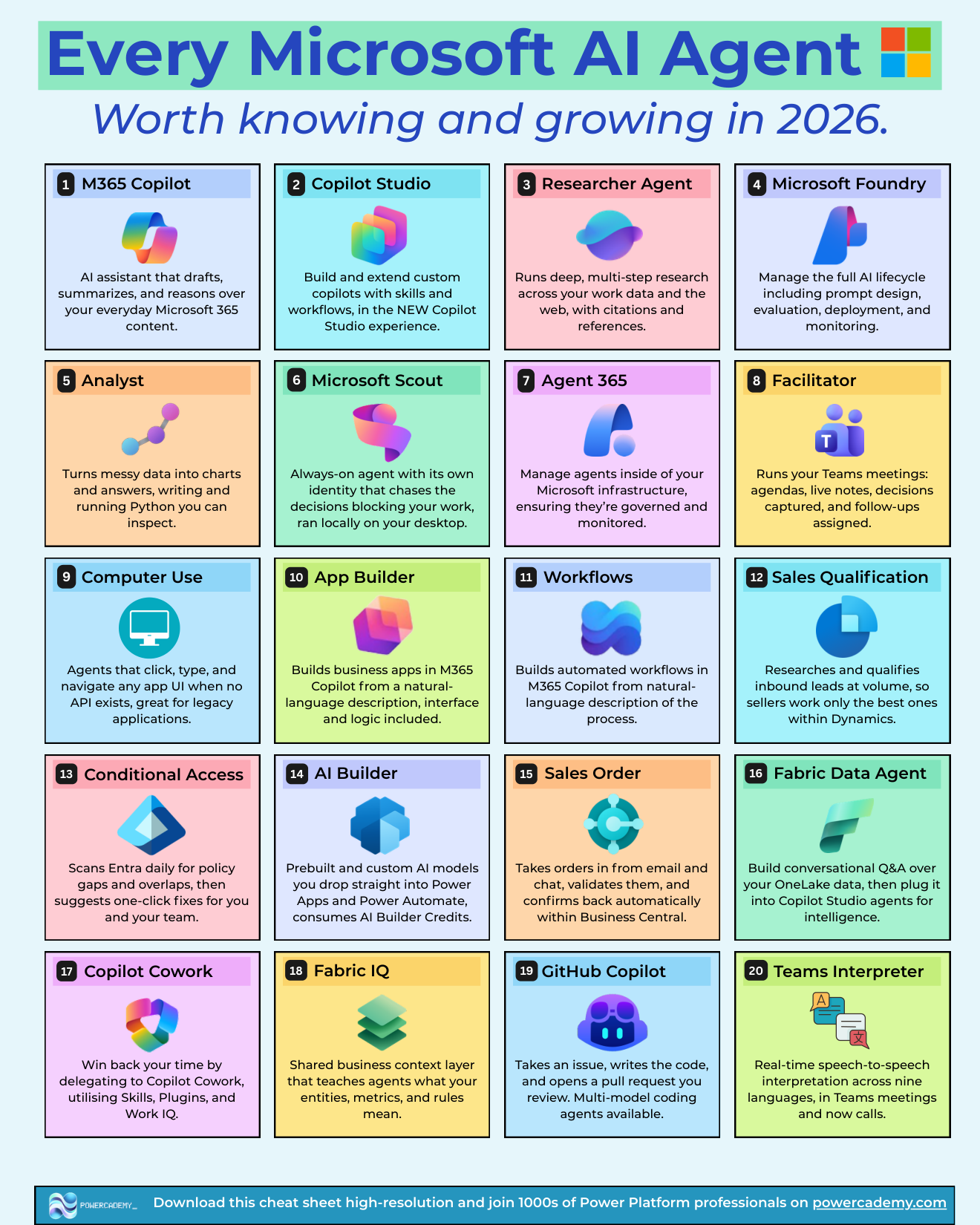
Want the hi-res version of this cheat sheet? It's free in the Powercademy Success Kit, along with hundreds of other Microsoft AI resources.
What counts as a Microsoft AI agent in 2026?
The full set: M365 Copilot, Copilot Studio, Researcher, Microsoft Foundry, Analyst, Microsoft Scout, Agent 365, Facilitator, Computer Use, App Builder, Workflows, Sales Qualification, Conditional Access, AI Builder, Sales Order, Fabric Data Agent, Copilot Cowork, Fabric IQ, GitHub Copilot, and Teams Interpreter. Some are agents you talk to, some are agents that work in the background, and some are platforms for building agents of your own. Grouping them by what they do for you makes the list much easier to hold in your head.
Which agents work alongside you in Microsoft 365?
M365 Copilot is the everyday assistant - it drafts, summarizes, and reasons over your Microsoft 365 content, and it's the surface most of the other agents plug into.
Researcher runs deep, multi-step research across your work data and the web, returning answers with citations and references - closer to a research analyst than a search box.
Analyst turns messy data into charts and answers by writing and running Python you can inspect. Advanced data analysis without leaving Copilot.
Facilitator runs your Teams meetings: agendas, live notes, decisions captured, and follow-ups assigned before you've left the call.
Teams Interpreter does real-time speech-to-speech interpretation across nine languages in Teams meetings and now calls.
Copilot Cowork is the delegation layer - hand it a whole piece of work and it executes multi-step tasks using Skills, Plugins, and Work IQ, approving each action with you.
Which agents build things for you?
Copilot Studio is where you build and extend custom copilots and agents with skills and workflows - the maker platform for everything agent-shaped on the business side.
App Builder builds business apps in M365 Copilot from a natural-language description - interface and logic included.
Workflows does the same for automation: describe the process, get a working automated workflow in M365 Copilot.
AI Builder provides prebuilt and custom AI models you drop straight into Power Apps and Power Automate (it consumes AI Builder credits).
GitHub Copilot has grown from autocomplete into a coding agent: give it an issue, it writes the code and opens a pull request for your review, with multiple frontier models to choose from.
Microsoft Foundry is the pro-code end: manage the full AI lifecycle - prompt design, evaluation, deployment, and monitoring - for agents your engineering team builds.
Which agents run your business processes?
Sales Qualification researches and qualifies inbound leads at volume inside Dynamics, so sellers only work the best ones.
Sales Order takes orders in from email and chat, validates them, and confirms back automatically within Business Central.
Conditional Access scans Entra daily for policy gaps and overlaps, then suggests one-click fixes - a security agent working while you sleep.
Fabric Data Agent builds conversational Q&A over your OneLake data, which you can then plug into Copilot Studio agents for intelligence.
Fabric IQ is the shared business context layer that teaches agents what your entities, metrics, and rules actually mean - so "revenue" means the same thing to every agent in the company.
Which agents act autonomously - and how do you govern them?
Microsoft Scout is the always-on agent with its own identity that runs locally on your desktop - chasing the decisions blocking your work across local files, shell, browser, and Microsoft 365.
Computer Use agents click, type, and navigate any app UI when no API exists - the modern answer to legacy application automation.
Agent 365 is how IT keeps all of this sane: manage agents inside your Microsoft infrastructure like employees - inventoried, governed, and monitored.
FAQ
What's the difference between Copilot Cowork and M365 Copilot?
M365 Copilot is the thinking layer - it chats, drafts, and answers with you in the loop for every step. Cowork is the action layer - you describe the outcome and it does the multi-step work itself, checking in for approvals. Assistant versus delegate.
Which of these agents can I build with, rather than just use?
Copilot Studio, Microsoft Foundry, AI Builder, App Builder, and Workflows are the builder platforms. Fabric Data Agent sits in between - you configure it over your data rather than build it from scratch.
Do these agents need separate licences?
Mostly they attach to existing licensing: M365 Copilot's agents come with the Copilot licence, Dynamics agents with the relevant Dynamics apps, GitHub Copilot and Scout need GitHub Copilot licensing, and Copilot Studio has message-based capacity. Always check current terms - this area moves quickly.
Where should I start if my organisation has none of this yet?
Start with M365 Copilot plus one high-leverage specialist - Researcher or Analyst for knowledge work, Sales Qualification if you run Dynamics. Prove value on one workflow, put Agent 365 governance in place, then expand.
The hi-res, printable version of this cheat sheet is in the Powercademy Success Kit - free, along with hundreds of other cheat sheets, roadmaps, and guides for Microsoft professionals.