The All-In-One M365 Copilot Cheat Sheet

Howdang Rashid
Saturday, 22 August 2026 · 3 min read
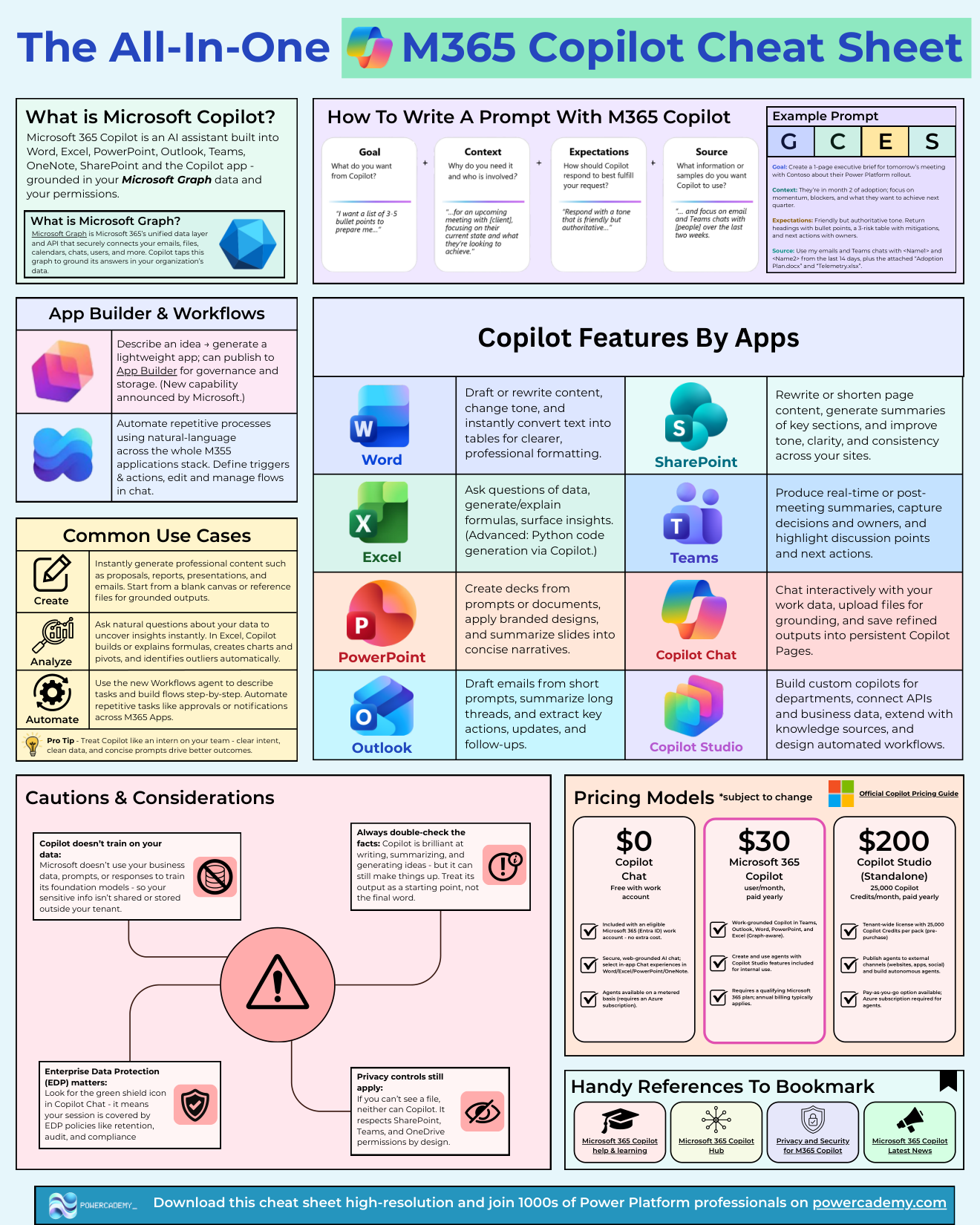
One sheet for the whole of M365 Copilot: what it is, what it does in each app, how to prompt it properly, what it costs, and where to be careful. Microsoft 365 Copilot is the AI assistant built into Word, Excel, PowerPoint, Outlook, Teams, OneNote, SharePoint, and the Copilot app - grounded in your Microsoft Graph data and your permissions.
Want the hi-res version? It's free in the Powercademy Success Kit.
What does Copilot do in each app?
Copilot Chat - chat interactively with your work data, upload files for grounding, and save refined outputs into persistent Copilot Pages.
Word - draft or rewrite content, change tone, convert text into tables.
Excel - question your data, generate and explain formulas, surface insights, and generate Python for advanced analysis.
PowerPoint - decks from prompts or documents, branded designs, slide summaries.
Outlook - drafts from short prompts, thread summaries, extracted actions and follow-ups.
Teams - real-time and post-meeting summaries with decisions and owners captured.
SharePoint - rewrite and summarise page content, improve tone across sites.
Copilot Studio - custom copilots for departments with connected APIs, business data, and automated workflows. Plus the newest pair: App Builder and Workflows - describe an idea, generate a lightweight app or automation across the M365 stack.
How do you write prompts that actually work?
The pattern across every app is the same: give it a goal, context, and a format. "Summarise" gets you generic output; "summarise this thread for my manager, focusing on the two open decisions, as five bullets" gets you something you can send. Ground with files first, ask second - and iterate in the same conversation rather than starting over.
What are the main use-case patterns?
Three verbs cover most of the value.
Create: professional content - proposals, reports, presentations, emails - from a blank canvas or grounded in reference files.
Analyse: natural questions over data, with Excel building formulas, charts, and pivots, and spotting outliers automatically.
Automate: the Workflows agent builds flows step by step from a description - approvals, notifications, repetitive tasks across M365.
FAQ
Is Copilot's output safe to trust?
Treat it as a strong first draft, not a final answer - verify figures, check citations, and review anything outbound. It's grounded in your data and permissions, which helps, but review remains your job.
What does M365 Copilot cost?
The core is a per-user add-on licence on top of Microsoft 365, with newer agentic capabilities (like Cowork) metered through usage-based billing. Model the mix - most organisations end up with licences for knowledge workers plus a usage budget.
Can Copilot see everything in our tenant?
It sees what the signed-in user can see - it respects existing permissions via Microsoft Graph. Which means over-shared SharePoint content becomes very visible; tidy permissions before broad rollout.
Where does Copilot Studio fit on this sheet?
It's the build layer: when a department needs its own copilot with custom knowledge and actions, you graduate from using Copilot features to building with Copilot Studio.
The hi-res version of this cheat sheet is in the Powercademy Success Kit - free, along with hundreds of other cheat sheets, roadmaps, and guides for Microsoft professionals.