Agent 365: The Ultimate Cheat Sheet

Howdang Rashid
Saturday, 22 August 2026 · 3 min read
Every organisation building AI agents hits the same question within months: who is keeping track of all of these? Agent 365 is Microsoft's answer - a unified control pane to inventory, govern, secure, and measure every agent your org builds or buys, whether it came from Microsoft, a partner, or open source. This cheat sheet covers what it is, why it matters, and how to start.
Want the hi-res version? It's free in the Powercademy Success Kit.
What are Agent 365 and Agent ID?
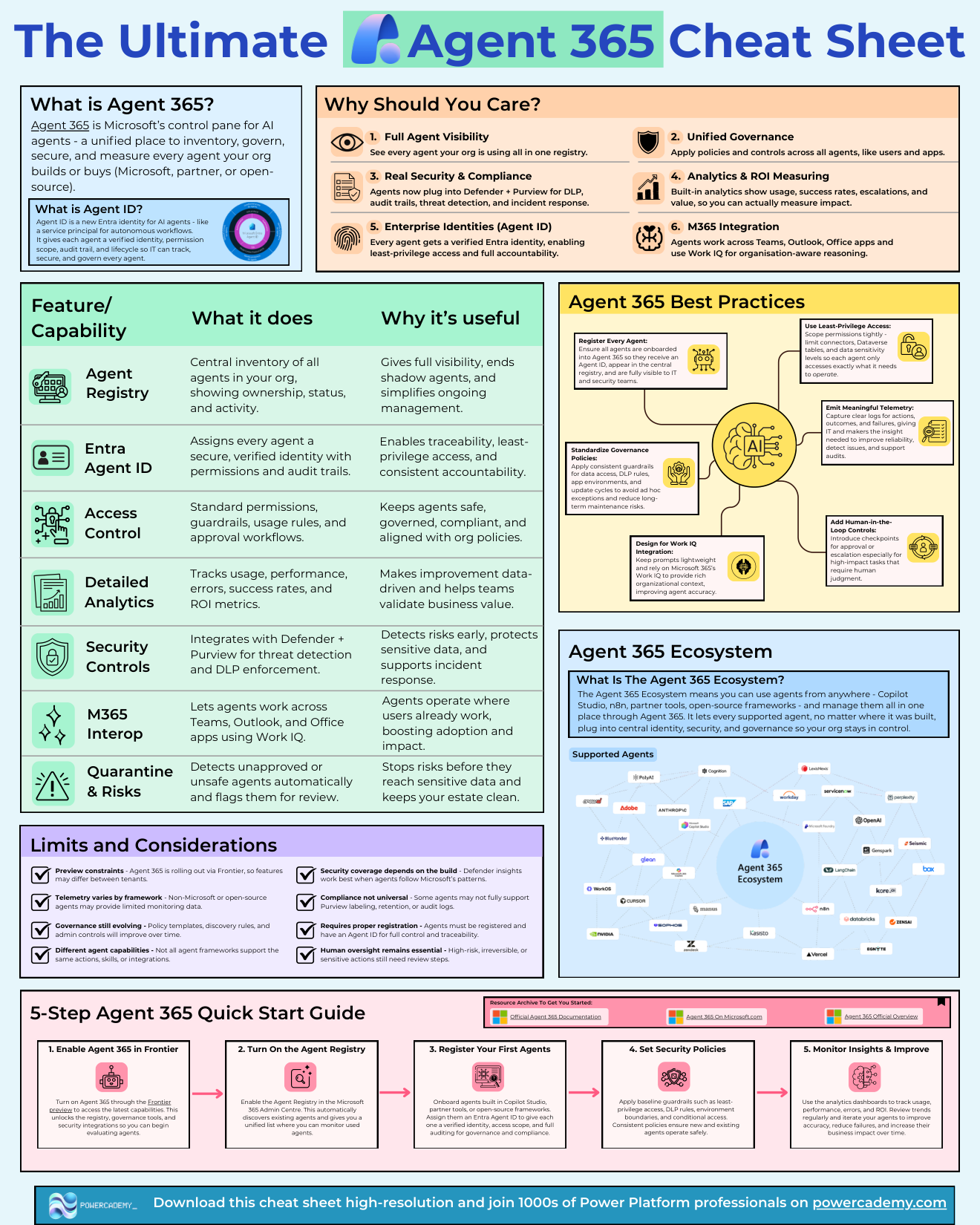
Agent 365 is the control pane: one place to see, govern, secure, and measure every AI agent in your organisation. Agent ID is the identity that makes it possible - a new Entra identity for AI agents, like a service principal for autonomous workflows. Each agent gets a verified identity, a permission scope, an audit trail, and a lifecycle, so IT can track and govern agents the way they already govern users and apps.
Why should you care?
Six reasons, in rising order of stakes: full agent visibility (every agent in one registry), unified governance (policies applied across all agents like users and apps), real security and compliance (agents plug into Defender and Purview for DLP, audit trails, and threat detection), analytics and ROI (usage, success rates, escalations, and value you can actually measure), enterprise identities via Agent ID, and M365 integration - agents working across Teams, Outlook, and Office with Work IQ for organisation-aware reasoning.
What can it actually do?
The capability set maps to problems you already have: the Agent Registry ends shadow agents with a central inventory showing ownership, status, and activity; access control adds standard permissions, guardrails, and approval workflows; detailed analytics track errors, success rates, and ROI; security controls integrate Defender and Purview for threat detection and DLP; and quarantine automatically detects unapproved or unsafe agents and flags them for review before they reach sensitive data.
And the ecosystem is deliberately open: agents from Copilot Studio, n8n, partner tools, or open-source frameworks all plug into the same central identity, security, and governance - your org stays in control regardless of where an agent was built.
How do you start well?
The quick-start best practices: register every agent so it gets an Agent ID and appears in the registry; use least-privilege access - scope connectors, Dataverse tables, and data sensitivity tightly; standardise governance policies for data access, DLP, and update cycles; design for Work IQ - keep prompts lightweight and let Microsoft 365's context do the heavy lifting; emit meaningful telemetry for actions, outcomes, and failures; and add human-in-the-loop checkpoints for high-impact tasks.
Know the limits too: Agent 365 is rolling out via Frontier so features vary between tenants, telemetry depth depends on the agent's framework, governance tooling is still evolving, and security coverage depends on how each agent is built.
FAQ
Does Agent 365 only work with Microsoft-built agents?
No - that's its headline feature. Copilot Studio, partner tools, n8n, and open-source frameworks can all register, receive Agent IDs, and fall under the same governance. It's the control plane for the whole estate, not just the Microsoft corner.
What's the difference between Agent ID and a service principal?
Conceptually similar - both are non-human identities - but Agent ID is purpose-built for autonomous AI: permission scopes for agent actions, lifecycle management, and audit trails designed around agent behaviour rather than app registration.
Do small organisations need this?
If you have more than a handful of agents touching business data - yes, at least the registry and Agent IDs. Visibility is the part that doesn't scale down badly; you can add heavier governance as the estate grows.
How does this relate to Copilot Studio's own settings?
Copilot Studio governs how an agent is built; Agent 365 governs the agent as an organisational citizen - identity, access, monitoring, and compliance across every platform. You'll use both layers together.
The hi-res version of this cheat sheet is in the Powercademy Success Kit - free, along with hundreds of other cheat sheets, roadmaps, and guides for Microsoft professionals.