20 M365 Copilot Use Cases to Win Back Your Week

Howdang Rashid
Saturday, 22 August 2026 · 3 min read
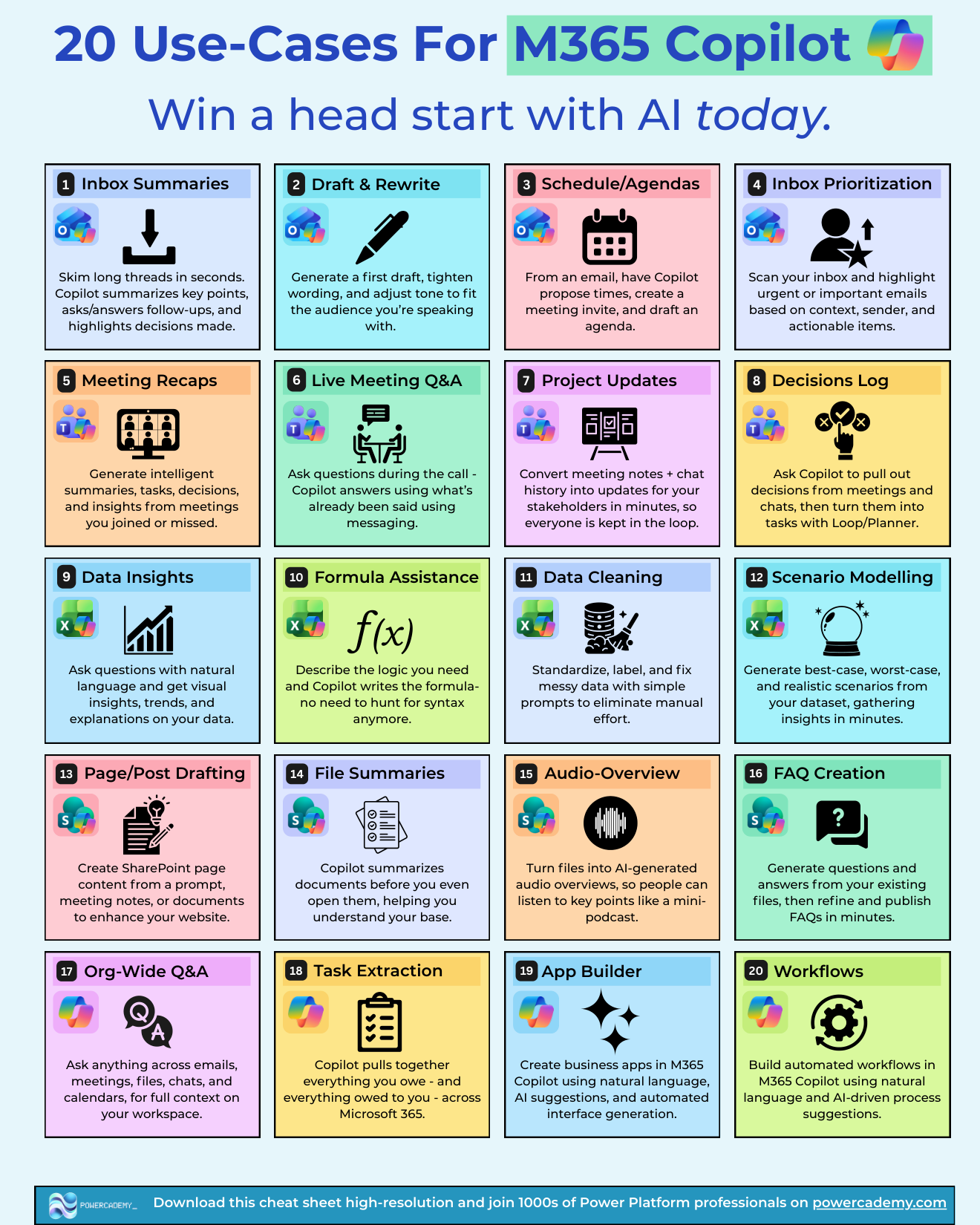
Most organisations buy M365 Copilot and then use ten percent of it - summarise an email here, draft a paragraph there. These twenty use cases are the rest of the value: concrete, repeatable ways to hand work to Copilot across Outlook, Teams, Excel, SharePoint, and beyond, from quick wins to genuine head starts.
Want the hi-res version? It's free in the Powercademy Success Kit.
How does Copilot transform email and scheduling?
Inbox summaries skim long threads in seconds, highlighting decisions and answering follow-ups. Draft and rewrite generates first drafts and adjusts tone to your audience. Schedules and agendas turn an email into proposed times, an invite, and a drafted agenda. Inbox prioritisation scans for urgent and actionable messages by context and sender.
What does it do for meetings and projects?
Meeting recaps deliver summaries, tasks, and decisions from meetings you joined or missed. Live meeting Q&A answers questions mid-call using what's already been said. Project updates convert notes and chat history into stakeholder updates in minutes. Decisions logs pull decisions from meetings and chats into tasks via Loop and Planner. Task extraction gathers everything you owe - and everything owed to you - across Microsoft 365.
How does it level up your data work?
Data insights answer natural-language questions with visual trends and explanations. Formula assistance writes the Excel formula from your described logic - no more syntax hunting. Data cleaning standardises and fixes messy data with simple prompts. Scenario modelling generates best-case, worst-case, and realistic scenarios from your dataset in minutes.
What about content and knowledge?
Page and post drafting creates SharePoint page content from a prompt or meeting notes. File summaries digest documents before you even open them. Audio overviews turn files into mini-podcast summaries people can listen to. FAQ creation generates Q&A from existing files, ready to refine and publish. Org-wide Q&A answers anything across emails, meetings, files, chats, and calendars.
Can it build things too?
Yes - the two newest use cases turn Copilot from assistant into maker: App Builder creates business apps from natural language, interface and logic included, and Workflows builds automated processes from a plain-language description. Dashboards, forms, daily digests, file routing - built where you already work.
FAQ
Which use case delivers value fastest?
Meeting recaps, almost universally - everyone has meetings, the summaries are immediately useful, and missed-meeting recaps feel like a superpower on day one.
Do all twenty work with a standard M365 Copilot licence?
They're all M365 Copilot features, though App Builder and Workflows are still rolling out to tenants, and admins can disable features. If one is missing, check rollout status and tenant settings before assuming licensing.
How is org-wide Q&A different from search?
Search finds documents; org-wide Q&A answers questions - reasoning across mail, meetings, files, and chats with your permissions respected, and citing where each answer came from.
When do I need Copilot Studio instead of these?
When the use case needs to serve other people - a departmental agent, custom knowledge, actions on business systems. These twenty are personal productivity; the moment it becomes a shared, governed capability, it's a Copilot Studio build.
The hi-res version of this cheat sheet is in the Powercademy Success Kit - free, along with hundreds of other cheat sheets, roadmaps, and guides for Microsoft professionals.