How to Learn Copilot Cowork: Delegate Work Like a Director

Howdang Rashid
Saturday, 22 August 2026 · 3 min read
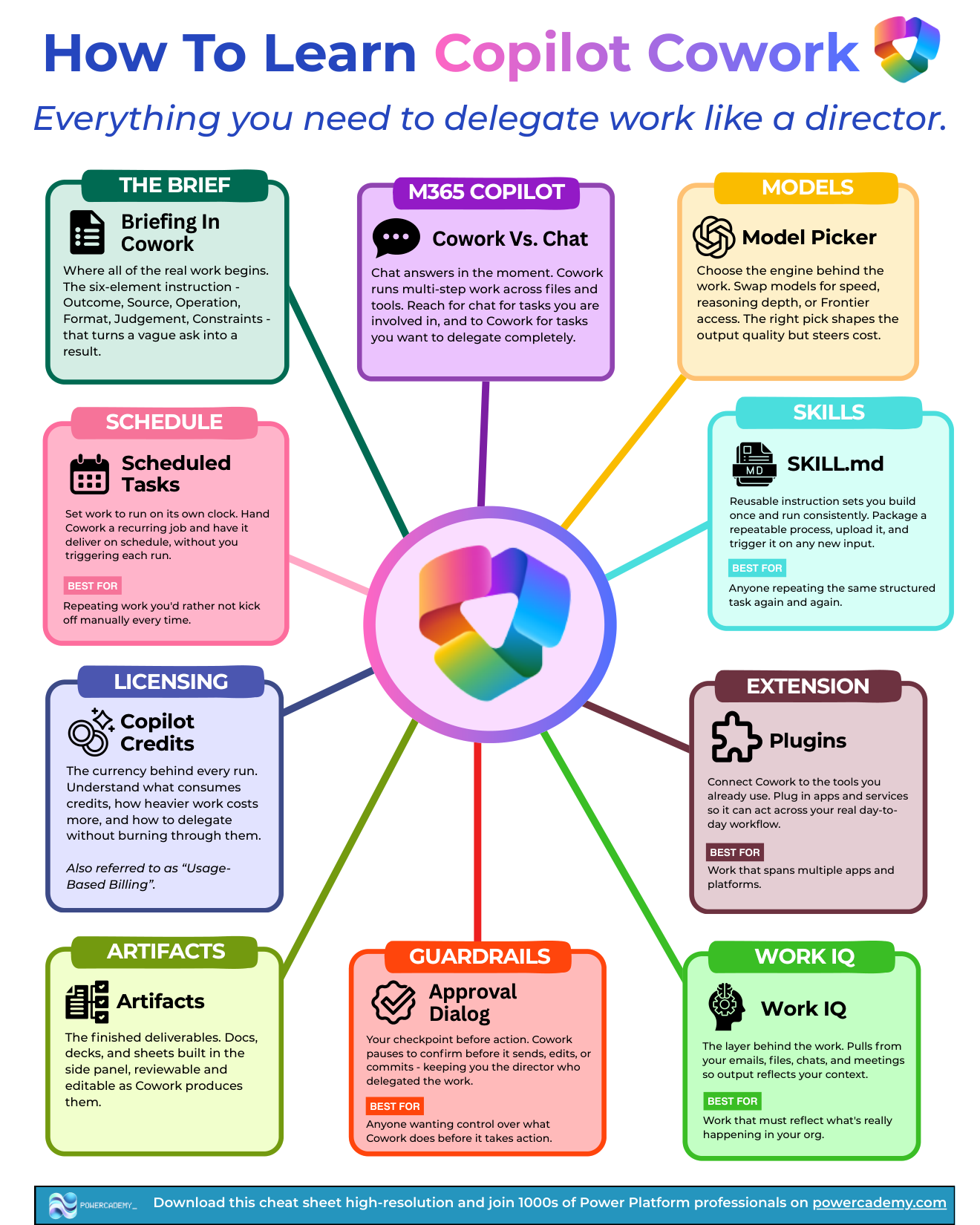
Learning Cowork isn't about learning buttons - it's about learning to delegate like a director. Ten concepts cover the whole discipline, from writing a brief that gets results to understanding the credits every run consumes. Master these and Cowork stops being a demo and starts being a colleague.
Want the hi-res version? It's free in the Powercademy Success Kit.
How do you brief Cowork properly?
The brief is where all real work begins: a six-element instruction - Outcome, Source, Operation, Format, Judgement, Constraints - that turns a vague ask into a result. And know Cowork versus Chat: Chat answers in the moment for tasks you're involved in; Cowork runs multi-step work across files and tools for tasks you delegate completely.
What are the delegation mechanics?
The model picker chooses the engine behind the work - swap models for speed, reasoning depth, or early access; the pick shapes output quality and cost. Skills are reusable instruction sets (SKILL.md) you build once and run consistently - package a repeatable process and trigger it on any new input. Plugins connect Cowork to apps and services beyond M365, for work that spans platforms. And Work IQ is the layer behind everything - pulling from your emails, files, chats, and meetings so output reflects your real organisational context.
How do you stay in control?
The approval dialog is your checkpoint before action - Cowork pauses to confirm before it sends, edits, or commits, keeping you the director who delegated the work. Artifacts are the finished deliverables: docs, decks, and sheets built in the side panel, reviewable and editable as Cowork produces them.
What about cost and automation?
Copilot credits (usage-based billing) are the currency behind every run - understand what consumes them, how heavier work costs more, and how to delegate without burning through them. Scheduled tasks put work on its own clock: hand Cowork a recurring job and it delivers on schedule without you triggering each run - perfect for the work you'd rather not kick off manually every time.
FAQ
What does a six-element brief look like in practice?
"Build a one-page status update (outcome) from this week's emails and the project folder (source) by summarising progress against milestones (operation) as a Word doc with a RAG table (format), flagging anything you judge at risk (judgement), without contacting anyone (constraints)." Every element answered, no ambiguity.
When should I switch models?
Default is fine for routine document work. Step up to stronger reasoning models for analysis, judgement calls, and long multi-step runs - the quality difference on complex work outweighs the extra credit cost.
How do I keep credit consumption sane?
Scope sources tightly (a folder, not your whole OneDrive), use scheduled tasks for predictable work rather than ad hoc mega-runs, and match the model to the job. Heavier reasoning plus broader sources equals more credits - spend them where judgement matters.
Where should scheduled tasks start?
The daily briefing and a weekly report - both low-risk, immediately useful, and perfect for learning how Cowork behaves unattended before you schedule anything with real stakes.
The hi-res version of this cheat sheet is in the Powercademy Success Kit - free, along with hundreds of other cheat sheets, roadmaps, and guides for Microsoft professionals.