How to Add JavaScript to Model-Driven App Forms (Step by Step)

Howdang Rashid
Saturday, 22 August 2026 · 2 min read
When business rules run out, JavaScript picks up - and wiring code into a model-driven form follows the same four-step pattern every time. Learn it once and every form script for the rest of your career follows the same road: file → web resource → form library → event handler.
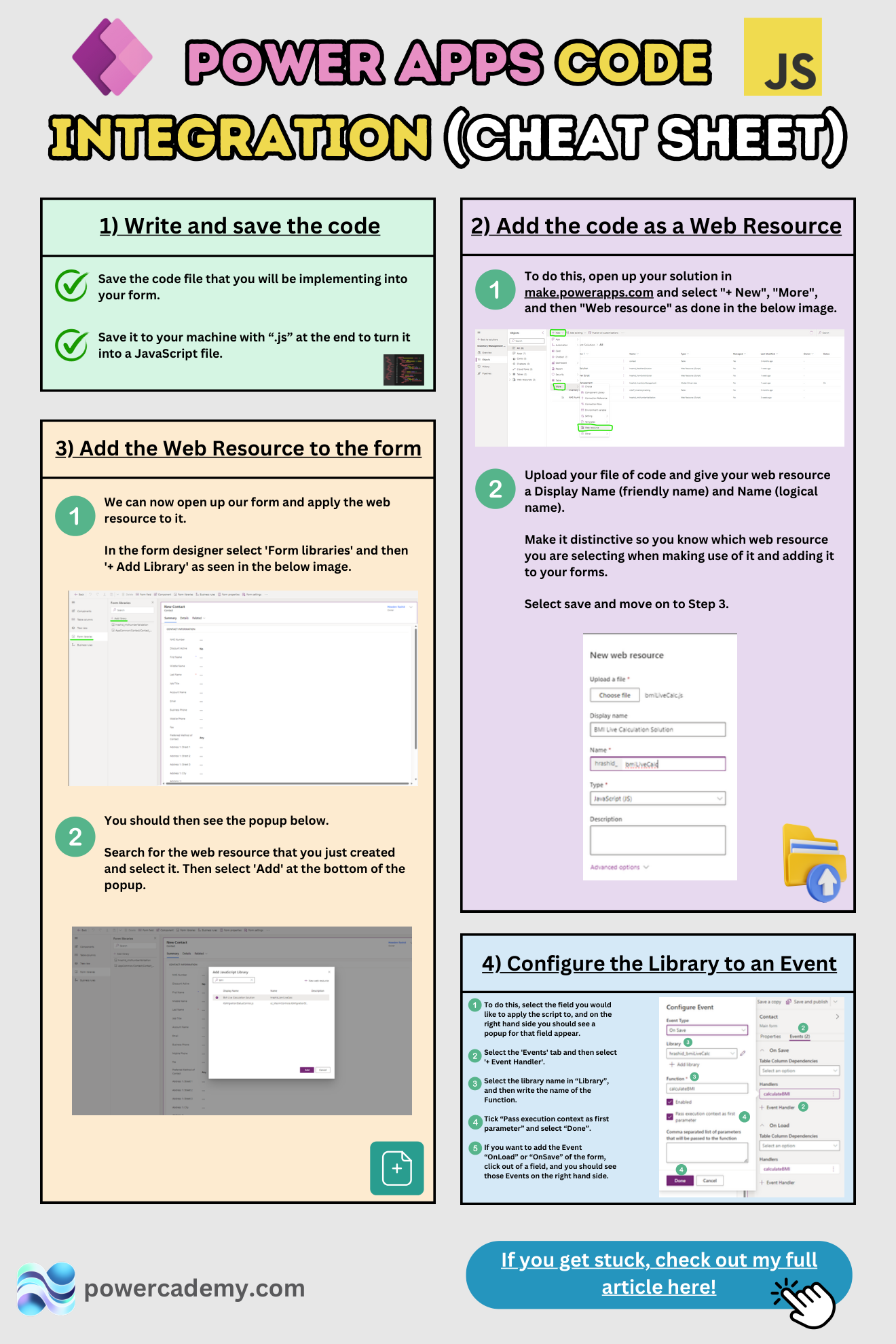
Want the hi-res version? It's free in the Powercademy Success Kit.
What are the four steps?
Write and save the code. Save your script locally with a
.jsextension - that file is what the platform will host.Add it as a web resource. In your solution: + New → More → Web resource, upload the file, and give it a distinctive display name and logical name so you can find it later among dozens.
Add the web resource to the form. In the form designer: Form libraries → + Add library, search for your resource, add it.
Configure the library to an event. Select the field (or the form), open the Events tab, + Event Handler, pick your library, and enter the function name. Tick "pass execution context as first parameter" - without it, most scripts silently do nothing.
When should a form need JavaScript at all?
The ladder matters: business rules first (no code, no deployment risk), then JavaScript for what they can't do - controlling multi-select fields, complex conditional visibility, calling web APIs from the form, or reacting to combinations of changes. Code is powerful and permanent; every script you add is a script someone maintains.
What are the classic mistakes?
Three cover most support tickets: using display names instead of logical names in getAttribute/getControl, forgetting the execution-context checkbox, and not publishing the form after wiring the handler. If "nothing happens", it's one of these.
FAQ
Why does my function need execution context?
The context is how your code reaches the form: executionContext.getFormContext() gives you the attributes and controls. Without the checkbox, your function runs with no way to touch the form - hence the silent nothing.
Should the same function run On Load and On Change?
Usually yes for visibility logic: On Change keeps the form reactive, On Load makes it correct when the record opens. Write one function, wire it to both events.
Is form JavaScript still the modern approach?
For form-level behaviour, yes - it's fully supported via the formContext API. Modern alternatives cover other layers: business rules for simple logic, PCF for custom controls, and custom/generative pages for whole screens.
How do I debug a form script?
Browser dev tools: F12, find your web resource under sources, set breakpoints, and use console.log during development. Remember each edit needs the web resource re-uploaded (or edited in place) and published.
The hi-res version is in the Powercademy Success Kit - free, along with hundreds of other cheat sheets, roadmaps, and guides for Microsoft professionals.